Video Stretched Aspect Ratio
A stretched video has the wrong display shape: circles look oval and people look unusually wide or narrow. Check the stored width and height, sample aspect ratio (SAR), and display aspect ratio (DAR) before changing pixels. If the pixels are correct but the display metadata is wrong, a metadata override may avoid re-encoding. If the pixels themselves are distorted, you must scale, crop, or pad and encode a corrected frame.
How do I tell whether the pixels or the aspect-ratio metadata are wrong?
Start with an object whose real shape you know. A circular logo, wheel, clock face, or square title card is a useful reference. If the file reports 1920 × 1080 and square pixels but a known circle is already oval in a frame export, the distortion is in the pixels. Changing only the display label will not restore missing geometry.
If a raw frame looks correctly proportioned when viewed as square pixels, but the video player stretches it, inspect SAR and DAR. FFmpeg defines the relationship as DAR = width ÷ height × SAR. That means a 720 × 576 frame can display wider than its stored pixel ratio when it uses non-square pixels.
Can I change a video's aspect ratio without re-encoding it?
Sometimes. FFmpeg stream copy uses -c copy to copy compressed packets without decoding, filtering, or encoding. It can be fast and avoids generational quality loss, but it cannot run video filters. A container-level display-aspect override may work when the stored pixels are correct and the target container, codec, and player all honor that metadata.
ffmpeg -i input.mp4 -aspect 16:9 -c copy output.mp4This command is a diagnostic option, not a universal repair. FFmpeg's own FAQ warns that the no-transcode form may not work across every format, codec, or player. Test the output in the actual playback environment before deleting the original.
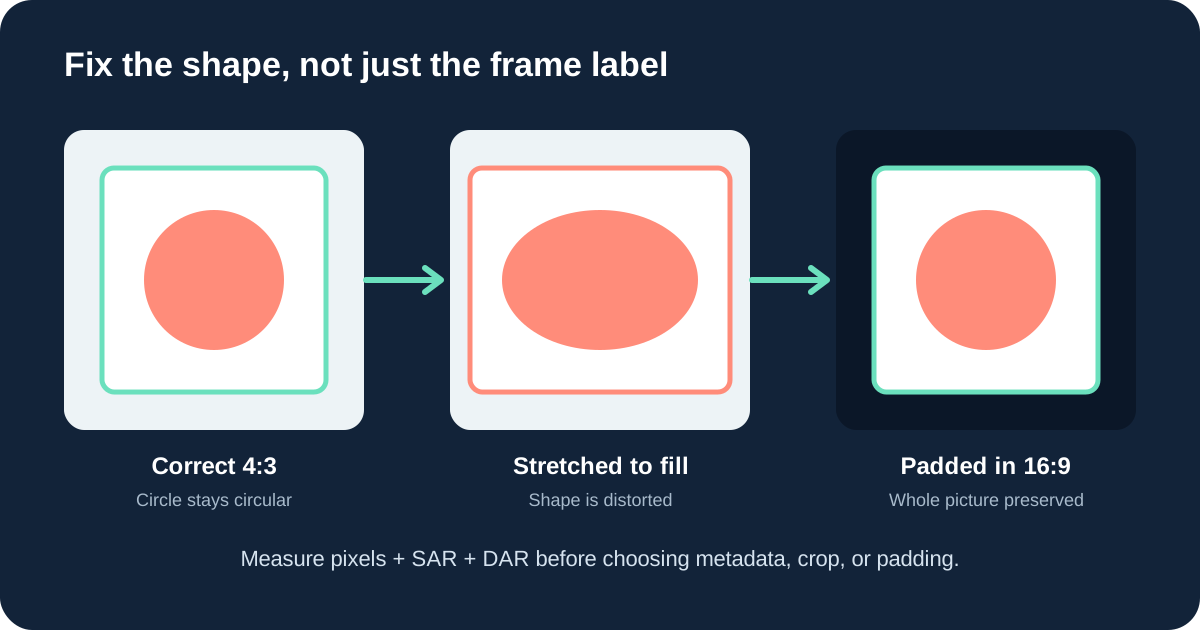
What if a 4:3 video was stretched to fill a 16:9 frame?
Assume the intended content is 1440 × 1080, which is exact 4:3, but it was stretched horizontally into 1920 × 1080. The horizontal stretch factor is 1920 ÷ 1440 = 1.333333. To restore the original geometry, scale the width back to 1440 while keeping the height at 1080.
If the delivery must remain 1920 × 1080, place the corrected 1440 × 1080 image in the center. The unused width is 1920 − 1440 = 480 pixels, so the frame needs 240-pixel bars on both sides. This preserves every source pixel vertically and avoids a second shape distortion.
| 4:3 repair ledger | Calculation | Result |
|---|---|---|
| Correct content size | 1080 × 4 ÷ 3 | 1440 × 1080 |
| Total side padding | 1920 − 1440 | 480 px |
| Padding per side | 480 ÷ 2 | 240 px |
| Content share of width | 1440 ÷ 1920 × 100 | 75% |
Should I crop or add black bars?
Use padding when keeping the whole picture matters. Use cropping when filling the destination frame matters more than retaining every edge. Never stretch width and height independently just to remove bars.
For a 1920 × 1080 16:9 video on a 1920 × 1200 16:10 screen, fitting by width keeps the video at 1920 × 1080. The unused height is 1200 − 1080 = 120 pixels, so centered playback leaves 60 pixels above and below. Filling the entire 16:10 screen instead requires enlarging the 16:9 frame to 2133.333 × 1200, then cropping about 213.333 pixels from the total width. After integer rounding, confirm that the crop remains centered and codec-compatible.
How do I calculate the correct replacement size?
Use the aspect ratio calculator when one side and the intended ratio are known. For exact 16:9 dimensions, use the 16:9 aspect ratio calculator. For 4:3 source repair and crop/pad examples, use the 4:3 aspect ratio calculator.
Keep the original file until the repaired output has been checked in the target player. A technically valid file can still display differently if a player ignores or replaces aspect-ratio metadata.
Stretched video aspect-ratio questions
Why does my video look wider after import?
The editor may be interpreting sample-aspect or display-aspect metadata differently from the source player. Compare the stored dimensions, SAR, DAR, and a known shape before changing pixels.
Does changing DAR change the actual pixels?
No. FFmpeg documents that the setdar filter changes display-aspect information without changing the frame's pixel dimensions.
Can stream copy fix every stretched video?
No. It can help when only container-level display metadata is wrong, but it cannot run filters or repair pixels that were already stretched.
How do I fit 16:9 video on a 16:10 screen?
Fit by width and keep 60-pixel bars above and below for a 1920 × 1200 screen, or crop the left and right edges after proportional scaling. Do not stretch the axes independently.
Sources
Technical behavior was checked against the official FFmpeg FAQ, FFmpeg documentation, and FFmpeg filters documentation. The worked pixel calculations are original arithmetic for this page.