4:3 Aspect Ratio Calculator
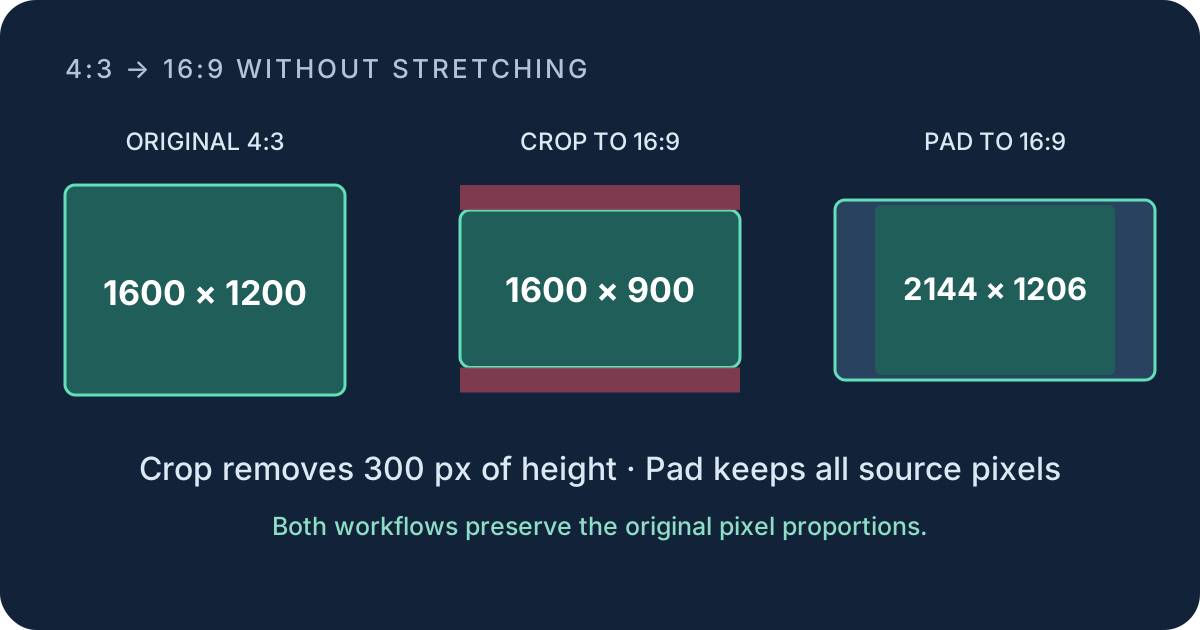
For 4:3, calculate height = width × 3 ÷ 4 or width = height × 4 ÷ 3. A 1600 px width gives exactly 1200 px. To convert that frame to 16:9 without stretching, crop it to 1600 × 900 or place it inside a wider canvas.
Generate exact whole-pixel 4:3 sizes
Use the sequence 4n × 3n, where n is a positive whole number. It guarantees an integer width and height with no rounding. To audit a proposed pair, divide width by 4 and height by 3. The dimensions are exactly 4:3 when both quotients are the same whole number.
| n | Width | Height | Equality check |
|---|---|---|---|
| 80 | 320 | 240 | 320 ÷ 4 = 240 ÷ 3 = 80 |
| 120 | 480 | 360 | 480 ÷ 4 = 360 ÷ 3 = 120 |
| 160 | 640 | 480 | 640 ÷ 4 = 480 ÷ 3 = 160 |
| 200 | 800 | 600 | 800 ÷ 4 = 600 ÷ 3 = 200 |
| 256 | 1024 | 768 | 1024 ÷ 4 = 768 ÷ 3 = 256 |
| 300 | 1200 | 900 | 1200 ÷ 4 = 900 ÷ 3 = 300 |
| 400 | 1600 | 1200 | 1600 ÷ 4 = 1200 ÷ 3 = 400 |
| 512 | 2048 | 1536 | 2048 ÷ 4 = 1536 ÷ 3 = 512 |
Calculate a missing 4:3 side
Known width
Height = width × 3 ÷ 4
Known height
Width = height × 4 ÷ 3
A width divisible by 4 gives a whole-number height. A height divisible by 3 gives a whole-number width. For a width of 1000, the height is 1000 × 3 ÷ 4 = 750, so 1000 × 750 is exact. For a height of 1000, the width is 1000 × 4 ÷ 3 = 1333⅓, so an integer width requires rounding or a nearby exact size.
Convert 1600 × 1200 from 4:3 to 16:9
Keep the 1600 px width. The 16:9 height is 1600 × 9 ÷ 16 = 900. Remove 1200 − 900 = 300 vertical pixels. A centered crop removes 150 px from the top and 150 px from the bottom.
An exact 16:9 canvas must be 16m × 9m. The first exact height at or above 1200 is 9 × 134 = 1206, with width 16 × 134 = 2144. Centering the original adds 272 px left and right, plus 3 px top and bottom.
The crop discards 25% of the original height because 300 ÷ 1200 = 0.25. The padded canvas keeps every source pixel but adds 665,664 canvas pixels: 2144 × 1206 − 1600 × 1200 = 2,585,664 − 1,920,000. Those added pixels can be a solid color, blur, graphic background, or transparent area if the file format supports it.
Use the same audit for 1024 × 768
For a width-preserving 16:9 crop, calculate 1024 × 9 ÷ 16 = 576. The result is 1024 × 576. Remove 768 − 576 = 192 vertical pixels, or 96 px from both the top and bottom for a centered crop.
For an exact padded canvas, 768 is not divisible by 9. The first multiple of 9 that can contain it is 774, where m = 86. The matching width is 16 × 86 = 1376. A centered 1376 × 774 canvas adds 176 px on each side and 3 px above and below the 1024 × 768 source.
This calculation separates three choices that are often mixed together: crop changes what remains visible, padding changes the canvas, and stretching changes the geometry of the source. Only the first two preserve the original pixel proportions.
4:3 calculation questions
How do I change 4:3 to 16:9 without stretching?
Crop the top and bottom to fill a 16:9 frame, or place the complete 4:3 frame inside a wider 16:9 canvas. Calculate the exact removed or added pixels before editing.
Is 1024 × 768 exactly 4:3?
Yes. Cross multiplication gives 1024 × 3 = 3072 and 768 × 4 = 3072.
Which 4:3 widths produce whole-pixel heights?
Widths divisible by 4. Divide the width by 4, then multiply the whole-number result by 3.