16:9 Aspect Ratio
Exact 16:9 is 1.777777…:1, not the finite ratio 1.77:1 or 1.78:1. A whole-pixel frame is exact when width × 9 = height × 16. Common exact sizes include 1280 × 720, 1920 × 1080, 2560 × 1440, and 3840 × 2160.
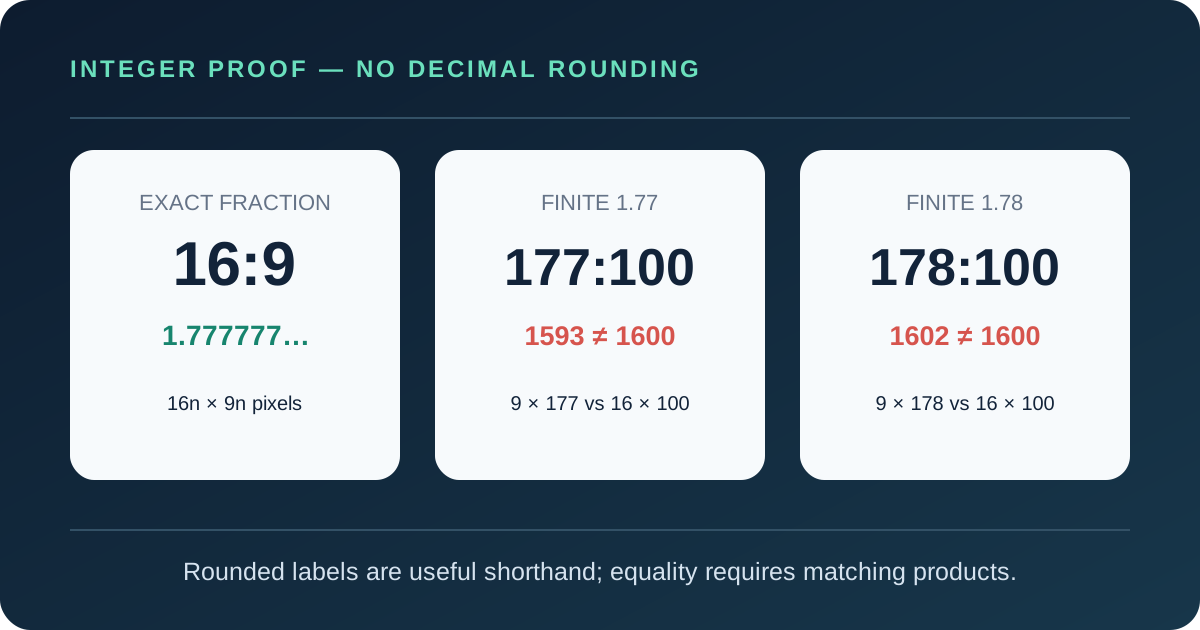
Does 16:9 equal 1.77:1 or 1.78:1?
No, if the decimal labels are read literally. Dividing 16 by 9 produces the repeating value 1.777777…, while both 1.77 and 1.78 stop after two decimal places.
For 1.77:1, compare 16 × 100 = 1600 with 9 × 177 = 1593. The seven-unit gap proves that 177:100 is not 16:9, and its width-to-height value is 0.4375% lower than exact 16:9.
For 1.78:1, compare 16 × 100 = 1600 with 9 × 178 = 1602. That two-unit gap makes 178:100 0.125% higher than exact 16:9. The two decimals are convenient rounded labels, but neither one is the fraction itself.
Verify a claimed 16:9 size in three steps
- 1Use the stored pixel dimensions
Write down the image or video width and height before a player scales the display.
- 2Build both integer products
Calculate width × 9 and height × 16 without rounding a decimal ratio.
- 3Demand equality
Matching products certify exact 16:9; any mismatch identifies only a nearby grid.
1366 × 768
1366 × 9 = 12,294
768 × 16 = 12,288
The products differ by six, so 1366 × 768 is close to 16:9 but not exact.
Exact 16:9 resolutions follow 16n × 9n
Every exact whole-pixel 16:9 frame can be written as 16n × 9n, where n is a positive whole number. In practical terms, an exact width is a multiple of 16 and its paired height is the same multiple of 9.
Given width W, the ideal height is W × 9 ÷ 16. Given height H, the ideal width is H × 16 ÷ 9. If that result is fractional, the fixed side cannot belong to an exact integer-pixel 16:9 frame.
Near-16:9 grids need an error label
The relative error used below is |W ÷ H − 16 ÷ 9| ÷ (16 ÷ 9) × 100. Reduced fractions and cross-products show why a familiar display label does not automatically prove exactness.
| Pixels | Reduced ratio | Cross-products | Relative error |
|---|---|---|---|
| 854 × 480 | 427:240 | 7686 vs 7680 | 0.078125% |
| 1366 × 768 | 683:384 | 12294 vs 12288 | 0.048828% |
| 1920 × 1080 | 16:9 | 17280 vs 17280 | 0% — exact |
| 2560 × 1440 | 16:9 | 23040 vs 23040 | 0% — exact |
Both 854 × 480 and 1366 × 768 sit slightly wider than exact 16:9. The second has the smaller relative error, yet its unequal cross-products still prevent an “exact” label.
At 1000 pixels wide, 563 pixels is the closer integer height
The ideal height is 1000 × 9 ÷ 16 = 562.5 pixels, so neither neighboring whole number can be exact.
Using 562 pixels gives 1000 × 562, a ratio of 1.779359431:1 and a relative error of 0.088968%. Its two cross-products are 9000 and 8992.
Using 563 pixels gives 1000 × 563, a ratio of 1.776198934:1 and a relative error of 0.088810%. Its cross-products are 9000 and 9008.
The 563-pixel option is closer by the ratio-error test even though both cross-product gaps have an absolute size of eight. If exactness matters more than keeping width 1000, use 1008 × 567, where n = 63.
Convert other frames to 16:9 without stretching
Crop and padding solve opposite constraints. Crop fills the destination by removing source area; padding preserves the entire source by leaving unused destination area.
4000 × 3000 photo into 1920 × 1080
The source is 4:3. To preserve it completely, scale it to 1440 × 1080 and place 240-pixel bars on the left and right, because (1920 − 1440) ÷ 2 = 240.
To fill the 16:9 frame, retain the 4000-pixel source width and crop its height to 4000 × 9 ÷ 16 = 2250. A centered crop removes 375 pixels from the top and 375 from the bottom.
2560 × 1080 ultrawide frame into 1920 × 1080
To preserve the entire ultrawide frame, scale it to 1920 × 810 and add 135-pixel bars above and below. The content stays geometrically unchanged.
To fill the destination at the source height, crop the source width from 2560 to 1920. A centered crop removes 320 pixels from each side.
Use the 16:9 aspect ratio calculator when the job is simply finding a missing side. Use these ledgers when you must decide which pixels to remove or where padding belongs.
For the separate 16:10 display case, see 16:9 on a 16:10 screen: crop or letterbox.
16:9 aspect ratio questions
Is 1.77:1 exactly the same as 16:9?
No. Literal 1.77:1 equals 177:100 and is 0.4375% lower than 16:9. Exact 16:9 repeats as 1.777777…:1.
Is 1366 × 768 an exact 16:9 resolution?
No. Its cross-products are 1366 × 9 = 12,294 and 768 × 16 = 12,288. The relative ratio error is 0.048828%, so it is a close display convention rather than an exact 16:9 grid.
Which resolutions are guaranteed to be exact 16:9?
Use 16n × 9n for a positive whole number n. Examples include 1280 × 720, 1920 × 1080, 2560 × 1440, and 3840 × 2160.
Should I crop or add bars when converting to 16:9?
Crop when the 16:9 destination must be completely filled; add bars when every source edge must remain visible. Do not stretch, because stretching changes the source geometry.
Sources and calculation scope
The adoption history and established resolution context were checked against the Wikipedia 16:9 overview. Square-pixel resolution conventions were compared with Pacoup’s true 16:9 resolution list. Production terminology and rounded 1.77/1.78 labels were checked against Boords’ 16:9 guide.
Every equality test, decimal difference, relative error, crop, and padding value on this page was recalculated from the dimensions printed beside it. The proof sequence, 1000-pixel rounding comparison, and two conversion ledgers were written specifically for this guide.