YouTube Aspect Ratio
A 9:16 video contained inside a fixed 1920 × 1080 frame is mathematically 607.5 × 1080. That leaves 1312.5 pixels of horizontal space: 656.25 pixels per side when centered. Those fractions are not a mistake. They explain why no whole-pixel 9:16 rectangle fits the full height of a 1080p 16:9 canvas exactly.
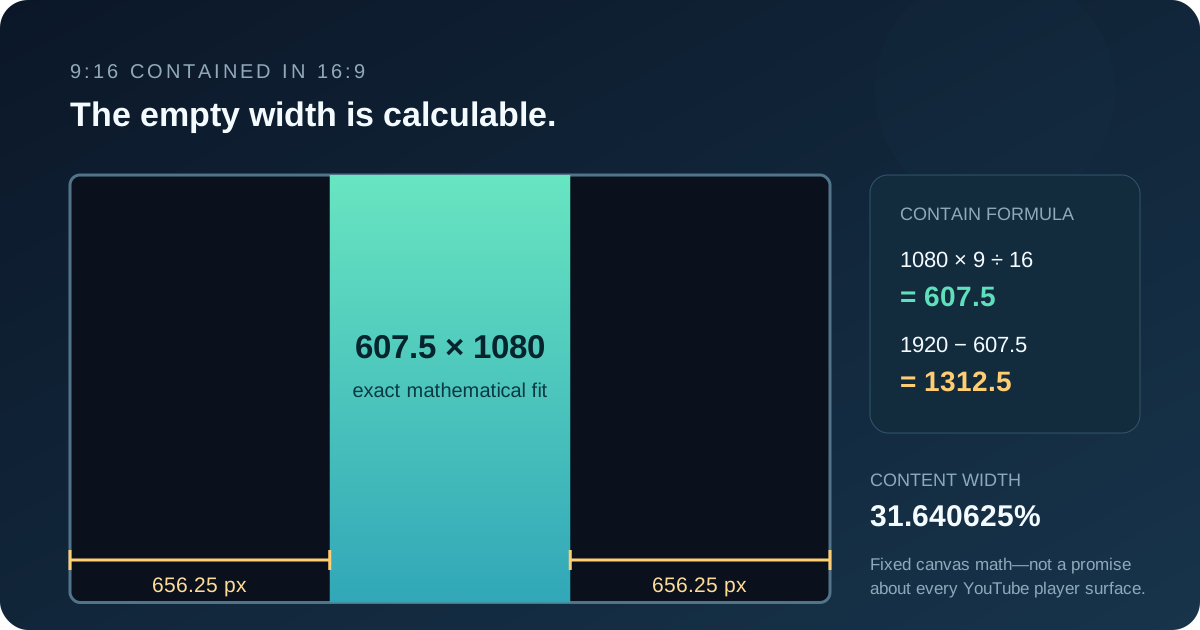
How much space does 9:16 leave inside 16:9?
Use a contain fit: preserve every source edge, scale until one destination edge is reached, and leave the unused area as padding. Let the video be Vw × Vh and the fixed canvas be Cw × Ch.
Contain formula
Scale = min(Cw ÷ Vw, Ch ÷ Vh)
Displayed width = Vw × scale
Displayed height = Vh × scale
Horizontal space = Cw − displayed width
Vertical space = Ch − displayed height
For centered content, divide the unused axis by two. The result can be fractional because scaling and display layout are not limited to whole source pixels.
For a 1080 × 1920 vertical source in a 1920 × 1080 frame, the limiting scale is 1080 ÷ 1920 = 0.5625. Multiplying both source dimensions by 0.5625 gives 607.5 × 1080. The horizontal remainder is 1920 − 607.5 = 1312.5, or 656.25 on each side.
| Fixed 16:9 canvas | Exact 9:16 fit | Total side space | Centered space per side |
|---|---|---|---|
| 1280 × 720 | 405 × 720 | 875 px | 437.5 px |
| 1920 × 1080 | 607.5 × 1080 | 1312.5 px | 656.25 px |
| 2560 × 1440 | 810 × 1440 | 1750 px | 875 px |
| 3840 × 2160 | 1215 × 2160 | 2625 px | 1312.5 px |
Why “656 pixels of black bar” is not an exact universal answer
The 1920 × 1080 example produces a 607.5-pixel content width. An integer raster cannot allocate half a pixel as a complete column. If an editor rounds the content to 608 pixels, it can use 656 columns on each side, but 608 × 1080 is not exactly 9:16. If it rounds down to 607, the 1313 remaining columns cannot be split equally: one side receives 656 and the other 657.
A browser player may position or scale content on fractional CSS-pixel boundaries and let the display compositor sample it. An exported bitmap must eventually resolve to physical pixels. Therefore the defensible exact answer is the mathematical fit first, followed by the specific renderer’s rounding rule. Calling both side bars exactly 656 physical pixels without naming that rule hides the half-pixel case.
Use a 1440-pixel-high canvas when you need this particular portrait-in-landscape construction to land on whole pixels symmetrically: 1440 is divisible by 16, so the exact portrait width is 1440 × 9 ÷ 16 = 810, and a 2560-pixel canvas leaves an even 1750-pixel remainder.
The ratio-only answer: 68.359375% of the width is unused
The percentage does not depend on 1080p or 4K. A 9:16 rectangle filling the height of a 16:9 frame occupies the fraction (9 ÷ 16) ÷ (16 ÷ 9) = 81 ÷ 256 of the frame width. That is 31.640625%. The remaining 175 ÷ 256 is 68.359375%, divided equally when centered.
| Region | Exact fraction of 16:9 width | Percentage |
|---|---|---|
| Visible 9:16 video | 81 ÷ 256 | 31.640625% |
| Both side regions | 175 ÷ 256 | 68.359375% |
| Each centered side region | 175 ÷ 512 | 34.1796875% |
This percentage is the useful invariant. Multiply it by the actual viewport width to estimate the combined side space, then remember that device scaling and subpixel placement can change the final count of physical display pixels.
Padding and crop are opposite answers
Contain keeps the entire vertical video and creates side space. Cover fills the 16:9 frame and discards the portrait frame’s top and bottom. Do not mix the two calculations.
Keep every source pixel visible
For a fixed 2560 × 1440 canvas, scale a 1440 × 2560 source to 810 × 1440. Add 875 pixels on the left and 875 on the right. A background color, blur, duplicate footage, or graphics can fill those regions.
Fill the frame with no side space
Start with that same 1440 × 2560 source. At full source width, an exact 16:9 crop retains 1440 × 810. The removed height is 2560 − 810 = 1750, so a centered crop removes 875 source pixels from the top and 875 from the bottom. The retained 1440 × 810 crop can then scale to 2560 × 1440.
The symmetry is useful for auditing: the 875-pixel side padding in the contained 2560 × 1440 result equals the 875-pixel top and bottom crop in source coordinates for the cover result. Both come from the same 9:16-versus-16:9 ratio gap.
Do not bake black bars into a YouTube upload by default
YouTube’s help documentation says the computer player’s standard ratio is 16:9, but the player automatically adapts to videos with other ratios. It also says some combinations, including 9:16 video in computer browsers, may receive extra padding. The padding color can vary with the viewing theme.
That means the calculations above are exact for a fixed 16:9 canvas or export—not a promise that every YouTube page, app, theater mode, embed, full-screen display, or browser window exposes the same number of visible bar pixels. YouTube specifically advises against adding padding or black bars directly to the uploaded file because baked-in padding can interfere with dynamic player sizing.
- 1Uploading a native vertical video?
Keep it 9:16 and let the player adapt unless your production requirements demand a fixed landscape master.
- 2Delivering a fixed 16:9 program?
Use the contain formula to budget side graphics, or the cover formula to quantify the crop before editing.
- 3Need whole-pixel symmetry?
Choose dimensions that make both the contained width and the remaining gap even, then verify by cross multiplication.
For other dimensions, use the aspect ratio converter to solve the proportional side, then apply the contain equations above.
YouTube vertical-video fit questions
How wide is a 9:16 video inside a 1920 × 1080 frame?
The exact mathematical width is 1080 × 9 ÷ 16 = 607.5 pixels. Centering leaves 656.25 pixels of horizontal space on each side before renderer-specific rounding.
Why can the side-bar result contain half pixels?
Because 1080 is not divisible by 16. An exact 9:16 width at that height is 607.5. Browsers can composite on fractional layout boundaries, while raster exports must round or resample.
How much of a 16:9 frame width does vertical video occupy?
An exact 9:16 video filling the frame height occupies 81/256, or 31.640625%, of the 16:9 width. The two side regions occupy 68.359375% combined.
Should I upload a vertical video with black bars already added?
Usually no. YouTube says its player adapts to the video and device and advises against adding padding or black bars directly to the file. Add them only when a fixed 16:9 deliverable is an intentional production requirement.
Sources and calculation scope
YouTube’s current player behavior, 16:9 computer default, possible padding for 9:16 computer playback, and warning against baked-in bars were checked against YouTube Help: Video resolution and aspect ratios. The upload guidance that the player adapts to vertical and square video was cross-checked against YouTube recommended upload encoding settings.
Every displayed dimension, fraction, percentage, crop, and padding amount was recalculated from the printed ratios. The sources establish platform behavior; the fit ledger and fractional-pixel analysis are original calculations for this guide.