SAR vs DAR Aspect Ratio Checker
Stored dimensions describe the pixel grid. Sample aspect ratio describes each pixel's display shape. Multiply them to get the display aspect ratio.
- Stored ratio
- 5:4
- Sample ratio
- 64:45
- Display ratio
- 16:9
- Display width
- 1024 px
- Expected ratio
- 16:9
- Ratio error
- 0.0000%
Three ratios, one auditable chain
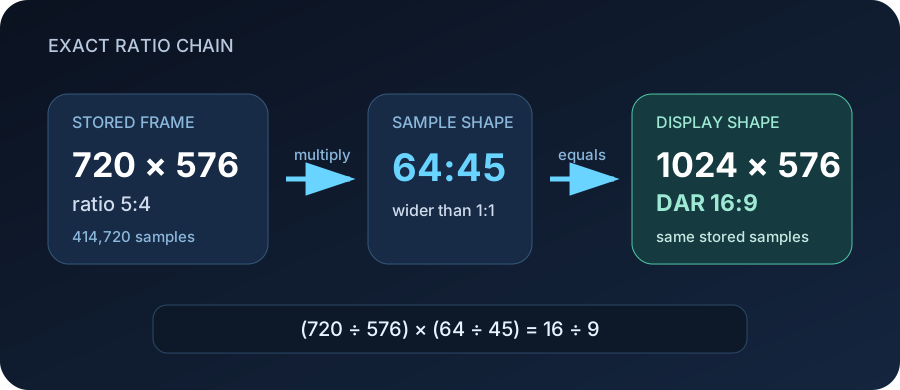
The 720 × 576 frame has a stored shape of 5:4. Its 64:45 sample ratio makes each displayed sample wider than a square. The exact chain is (720 ÷ 576) × (64 ÷ 45) = 16 ÷ 9. The player can therefore present a 1024 × 576 shape while the encoded frame remains 720 × 576.
The formula and the mismatch test
Let W:H be stored pixel dimensions and Sn:Sd be the sample aspect ratio. The unreduced display fraction is (W × Sn):(H × Sd). Reduce that fraction with its greatest common divisor:
DAR = (W ÷ H) × (Sn ÷ Sd) · display width = W × Sn ÷ Sd
For the default inputs, the display fraction begins as 46,080:25,920. Their greatest common divisor is 2,880, so the exact result is 16:9. The equivalent square-pixel width is 720 × 64 ÷ 45 = 1,024. No rounding is needed.
The checker compares the calculated DAR with the expected DAR by cross multiplication. For expected En:Ed, an exact match requires (W × Sn × Ed) = (H × Sd × En). The percentage shown above is the relative quotient error, not a guessed visual tolerance.
Four controlled tests
| Stored frame | SAR | Calculated DAR | Square-pixel shape | What the test isolates |
|---|---|---|---|---|
| 1920 × 1080 | 1:1 | 16:9 | 1920 × 1080 | Square-pixel baseline |
| 720 × 576 | 64:45 | 16:9 | 1024 × 576 | Non-square pixels, correct metadata |
| 720 × 576 | 1:1 | 5:4 | 720 × 576 | Same pixels, missing or reset SAR |
| 1440 × 1080 | 4:3 | 16:9 | 1920 × 1080 | Horizontally expanded display |
Tests two and three use the same 414,720 stored samples. Only the SAR changes. Their DAR moves from 16:9 to 5:4, a 29.6875% relative width-ratio difference. That isolates a metadata problem: a tag can change playback geometry without adding, removing or resampling a single stored pixel.
Tests one and four both display as 16:9, but they are not the same frame. The 1920 × 1080 source contains 2,073,600 stored samples; the 1440 × 1080 source contains 1,555,200, exactly 25% fewer. Matching DAR proves the intended shape, not equal horizontal detail.
Diagnose before changing anything
- Read the stream: inspect width, height,
sample_aspect_ratioanddisplay_aspect_ratiotogether. A single ratio is not enough. - Run the equation: if the calculated DAR matches the intended shape, playback metadata is internally consistent.
- Separate metadata from resampling: changing SAR or DAR tells a player how wide samples should appear. Scaling creates a new pixel grid.
- Check the visual content: if the math is correct but faces still look wide or narrow, the distortion may already be baked into the stored pixels.
A practical read command is ffprobe -v error -select_streams v:0 -show_entries stream=width,height,sample_aspect_ratio,display_aspect_ratio -of default=nw=1 input.ext. Treat its four values as a set.
SAR and DAR questions
Is SAR the stored aspect ratio?
Not in FFmpeg's field names. FFmpeg uses SAR for sample aspect ratio: the width-to-height shape of one displayed sample. The stored frame ratio is simply width divided by height. This page labels all three values to avoid the acronym collision.
Does changing SAR resize the video?
No. A SAR metadata change alters the intended display geometry. It does not create a new stored width or height. Use a scale operation when you actually need square-pixel output dimensions.
What does SAR 1:1 mean?
Each sample is displayed as a square, so DAR equals the stored width-to-height ratio. For 1920 × 1080, both reduce to 16:9.
Why can two files have the same DAR but different dimensions?
DAR describes shape, not sample count. A 1440 × 1080 frame with 4:3 SAR and a 1920 × 1080 frame with 1:1 SAR both display as 16:9.
Can a correct DAR still look stretched?
Yes. Metadata can be mathematically consistent while the picture content was stretched before encoding. Compare a known circle or measured object, then decide whether to change metadata or resample pixels.
Method and sources
The calculator uses integer cross products, greatest-common-divisor reduction and a separate relative-error calculation. It does not infer the intended shape from a filename, codec or platform label.
Evidence checked 2026-11-01: FFmpeg setdar and setsar filters, FFprobe source showing SAR and DAR calculation, FFmpeg sample_aspect_ratio field, and Matroska display and pixel dimension elements. These sources define fields and behavior; all examples, comparisons and error calculations above were produced for this page.