Rotate Aspect Ratio Checker
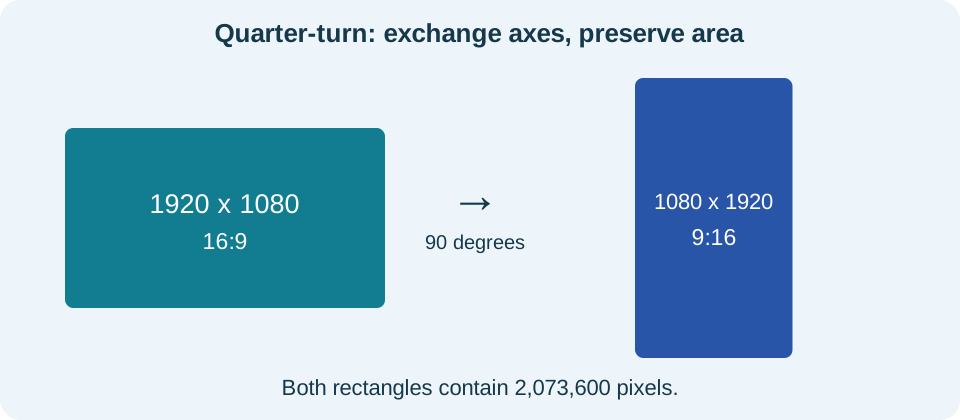
Rotate 1920 x 1080 by 90 degrees and get 1080 x 1920: the ratio becomes 9:16. Fit that result into a portrait 1080 x 1920 target with no crop or bars.
Centered fit and fill; square pixels. Fractional results are geometric sizes before rounding.
Derive the reciprocal without changing the image area
A quarter-turn maps a W by H rectangle to H by W. If the reduced starting ratio is A:B, the new ratio is B:A. With square pixels, a rigid rotation preserves the lengths of the two edges and the area W times H, but it exchanges the horizontal and vertical axes. It preserves shape without preserving the numerical width divided by height. Clockwise and counterclockwise turns have the same bounding dimensions, although they place the image content differently.
Our 1920 by 1080 example has a greatest common divisor of 120, giving 16:9. After 90 degrees it is 1080 by 1920, giving 9:16. Both products are 2,073,600 pixels. A 180-degree turn instead gives 1920 by 1080 again. A square is the special case: rotating 1200 by 1200 leaves both its ratio and its dimensions unchanged.
Test rotation against the target frame
Let the rotated raster be w by h and the target be Tw by Th. For fit, choose s=min(Tw/w,Th/h). The displayed rectangle is sw by sh; centered bars are (Tw-sw)/2 on the left and right and (Th-sh)/2 on the top and bottom. For fill, choose t=max(Tw/w,Th/h). The retained source rectangle is Tw/t by Th/t. Removed area share is 1-(Tw/t)(Th/t)/(wh). These are continuous geometric dimensions before any output-pixel rounding.
Turn 1920 by 1080 through 90 degrees, then fit it into a 1920 by 1080 target. The raster becomes 1080 by 1920; fit scale is 1080/1920=0.5625. Content measures 607.5 by 1080, so each side bar is (1920-607.5)/2=656.25 target pixels. The empty target area is 1-607.5/1920=68.359375%. Fractional edges need rasterization; reporting 608 pixels as an exact proportional width would conceal that rounding.
For fill into the same landscape target, scale is 1920/1080=1.777778 approximately. Retained source height is 1080/(1920/1080)=607.5. Each centered cut removes (1920-607.5)/2=656.25 source pixels from the top and bottom. Retained area is 1080 times 607.5=656,100 source pixels; dividing by 2,073,600 gives 31.640625%. The cropped share is 68.359375%. The bar widths and source cuts happen to have equal numbers here, but their coordinate systems differ.
Compare four reproducible rotation cases
| Source | Turn | After turn | Target | Fill loss |
|---|---|---|---|---|
| 1920 x 1080 | 90 | 1080 x 1920 | 1080 x 1920 | 0% |
| 1920 x 1080 | 90 | 1080 x 1920 | 1920 x 1080 | 68.359375% |
| 1200 x 1200 | 270 | 1200 x 1200 | 1920 x 1080 | 43.75% |
| 4000 x 3000 | 90 | 3000 x 4000 | 1080 x 1920 | 25% |
In the square test, filling a landscape target retains 1200 by 675 source pixels: 810,000/1,440,000=56.25%, leaving 43.75% cropped. A square can therefore keep its ratio during rotation and still lose area when placed into a differently shaped target.
For the last row, fill scale is 1920/4000=0.48, giving a retained width of 1080/0.48=2250 source pixels. From the rotated width of 3000, centered cuts remove 375 pixels per side. Retained area is 2250 times 4000=9,000,000, compared with the original 12,000,000. Fit instead uses scale 1080/3000=0.36, displays 1080 by 1440, and adds 240 target pixels above and below. This cross-check separates cropping from padding using the same input.
Catch an orientation mistake before export
For a reduced target ratio A:B, check the rotated dimensions using wB=hA. The equality 1080 times 16=1920 times 9 verifies 9:16 after the turn. Testing the original 16:9 label would instead compare 1080 times 9 with 1920 times 16; those products differ, so the old label cannot describe the new horizontal and vertical axes.
Forcing the rotated 1080 by 1920 content directly to 1920 by 1080 applies horizontal scale 16/9 and vertical scale 9/16. Their quotient is 256/81, approximately 3.160494. A circular feature becomes about 3.16 times wider than it is tall. That is anisotropic stretching rather than rigid rotation. Fit and fill both use one common scale, avoiding this distortion while accepting bars or crop loss.
Choose the dimensions that the viewer actually sees
This tool models quarter-turns of a square-pixel raster. Enter the image dimensions after its orientation has been interpreted. A file can store a rotation instruction instead of physically rearranged pixels; applying the same turn again may rotate it twice. Check an export in its intended viewer and compare the displayed width and height with the stored raster before choosing inputs.
The calculator does not edit files or infer metadata. Arbitrary angles such as 45 degrees require a larger bounding-box calculation and may introduce corner padding. Non-square pixel video also needs its pixel aspect ratio considered before interpreting display shape. The outputs here are geometric checks, not guarantees of encoder dimensions or supported modes.
Questions about rotating an aspect ratio
Does 16:9 become 9:16 after a quarter-turn?
Yes, when the complete rectangle is turned and its axes are measured again. The orientation changes from landscape to portrait. Its area stays the same.
Does rotating change resolution?
A quarter-turn exchanges the width and height of the modeled raster without changing their product. An export may also resize or crop, which is a separate operation.
Should I use 90 or 270 degrees?
They produce the same dimensions and opposite orientations of the content. Select the direction that makes the subject upright; the ratio alone cannot decide it.
References checked November 17, 2026
Implementation references describe rotation operations. The reciprocal proof, target-fit calculations, table and distortion audit above are independently derived here.
For a general frame comparison, use compare two aspect ratios. To check pixel divisibility, use the exact integer checker.