Compare Two Aspect Ratios
16:9 is 33.333% wider than 4:3 at equal height. Converting a 1920 × 1080 frame to 4:3 by centered cropping keeps 1440 × 1080 and removes 25% of the source area. Keeping the whole frame instead needs a 1920 × 1440 canvas, where padding occupies 25%.
Direct answer: 25% crop loss or 25% padding areaA is 33.333% wider at equal height
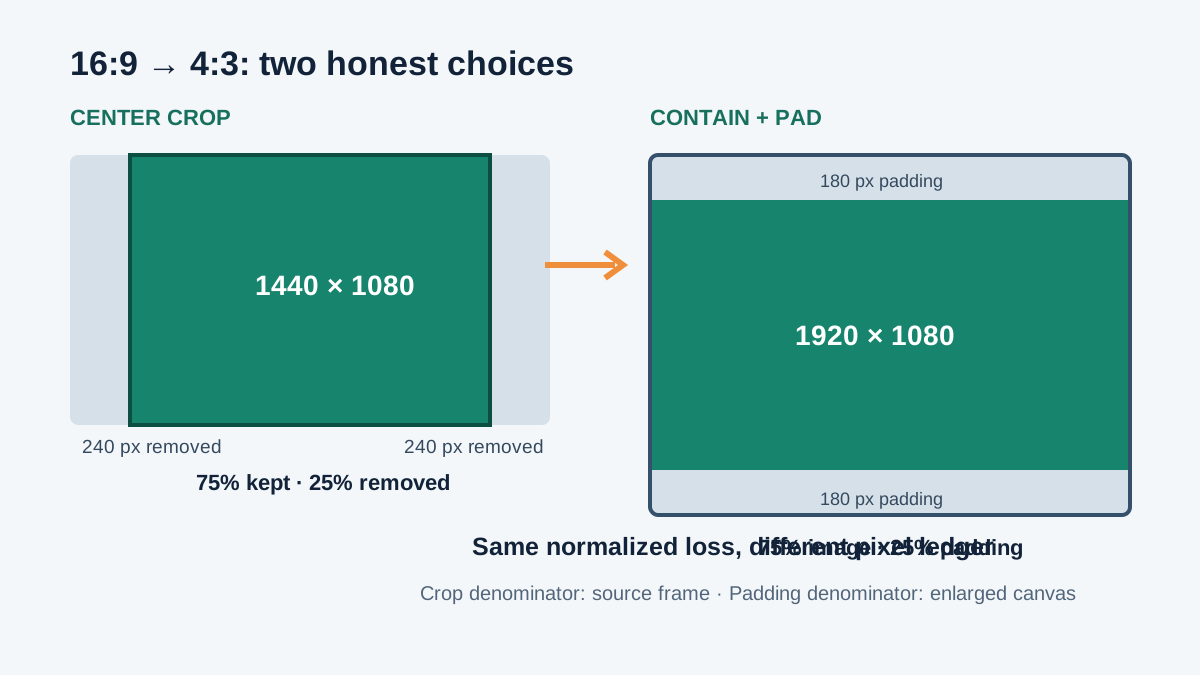
Audit the 16:9 versus 4:3 result
The decimal ratios are 16 / 9 = 1.777777… and 4 / 3 = 1.333333…. Their quotient is exactly (16 × 3) / (9 × 4) = 48 / 36 = 4 / 3. Therefore, at the same height, the 16:9 rectangle is 33.333% wider. Reversing the comparison gives a different wording: 4:3 is 25% narrower than 16:9 because 1 - 3 / 4 = 25%.
For a 1920 × 1080 source, the 4:3 crop width is 1080 × 4 / 3 = 1440 px. The removed width is 1920 - 1440 = 480 px, or 240 px from each side when centered. Retained pixels are 1,555,200 out of 2,073,600, confirming 75% retained and 25% discarded.
To retain every source pixel, hold the 1920 px width and solve the 4:3 canvas height: 1920 × 3 / 4 = 1440 px. The 360 added pixels split into 180 px above and below. Source area is again 75% of the resulting 2,764,800-pixel canvas, so padding occupies 25%.
One formula ledger for any two ratios
Ratios: rA = a / b, rB = c / d
Shape quotient: q = rA / rB = a × d / (b × c)
Retained or filled area share: f = min(q, 1 / q)
Centered crop loss and contain-padding share: L = 1 - f
The loss percentages match, but their pixel ledgers do not. Crop loss uses the original frame as its denominator; padding share uses the enlarged target-ratio canvas. Keeping that denominator visible prevents the common mistake of treating 480 removed horizontal pixels and 360 added vertical pixels as contradictory results.
If q is greater than 1, ratio A is relatively wider. Cropping A to B removes width; containing A inside a B-shaped canvas adds height. If q is below 1, cropping removes height and containing adds width. If q equals 1, the rectangles are proportional and every loss is zero.
Four independently calculated comparisons
| A versus B | Shape quotient | Crop retained | Crop / pad share |
|---|---|---|---|
| 16:9 vs 4:3 | 1.333333 | 75.000% | 25.000% |
| 3:2 vs 4:3 | 1.125000 | 88.889% | 11.111% |
| 2.39:1 vs 16:9 | 1.344375 | 74.384% | 25.616% |
| 9:16 vs 4:5 | 0.703125 | 70.313% | 29.688% |
The 3:2 to 4:3 row uses q = (3 × 3) / (2 × 4) = 9 / 8. The retained share is its reciprocal, 8 / 9, so the area loss is 1 / 9 or 11.111%. For 2.39:1 versus 16:9, q = 2.39 × 9 / 16 = 1.344375; its reciprocal is approximately 0.743840, leaving 25.616%.
The portrait test reverses the direction. Dividing 9:16 by 4:5 gives 45 / 64 = 0.703125. Ratio A is narrower, so a centered crop to 4:5 removes top and bottom rather than the sides. The retained share is already q, and the loss is 19 / 64 = 29.6875%.
How to read the result
Use the shape quotient when you need a directional statement such as “wider at equal height.” Use crop loss when the destination must be filled with no bars. Use padding share when every source pixel must remain visible. Stretching is not included because it changes geometry rather than allocating crop or empty area.
The calculator treats Ratio A as the source shape and Ratio B as the destination shape. Source width and height determine the pixel ledger; if those dimensions do not exactly match Ratio A, the tool first uses their actual shape so the output remains auditable.
Questions about comparing aspect ratios
Why are crop loss and padding share the same percentage?
Both are the complement of the smaller-to-larger ratio quotient. They use different total rectangles and different pixel counts, even though the normalized area share is equal.
Is 16:9 33.333% wider or is 4:3 25% narrower?
Both are correct because percentage change depends on the chosen baseline. The calculator labels the direction and shows the quotient.
Does a centered crop always remove equal pixels from both sides?
It splits the removed span equally in continuous geometry. Whole-pixel exports may need one side to differ by one pixel when the removed span is odd.
Can I compare portrait ratios?
Yes. Enter width first and height second for both ratios. The formulas work without changing for portrait shapes.
Sources
References checked on October 27, 2026: the MDN object-fit reference, the W3C object-fit definition, and Apple AVLayerVideoGravity documentation. The formulas, denominator analysis, test cases, comparisons, calculator, and SVG above were independently produced for this page.