Multi-Screen Combined Aspect Ratio Calculator
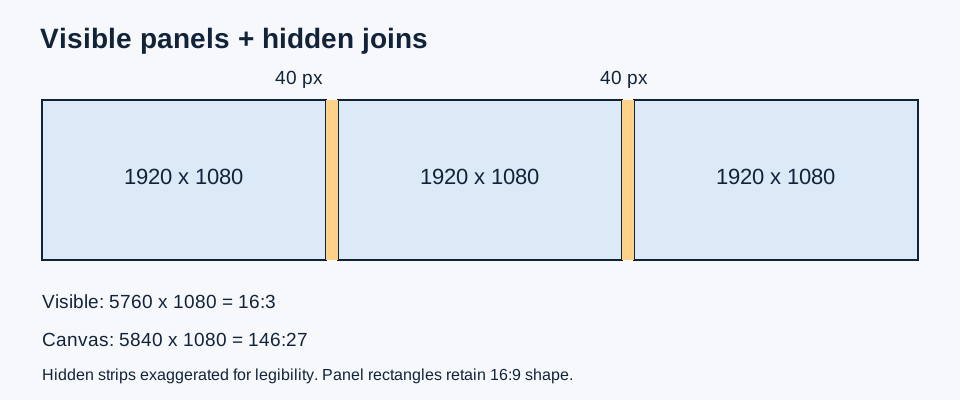
Three 1920 x 1080 screens in one row make a 5760 x 1080 visible raster (16:3). Allocating 40 hidden pixels at each of the two joins makes the compensated canvas 5840 x 1080 (146:27).
Derive a rectangular screen-array canvas
For C columns and R rows of identical panels, let w and h be each panel's active pixel width and height. Without compensation, the visible raster is Vw=Cw and Vh=Rh. Its ratio is Vw:Vh, reduced by the greatest common divisor. With an allocated hidden strip gx between neighboring columns and gy between neighboring rows, the compensated canvas is W=Cw+(C-1)gx and H=Rh+(R-1)gy. Reduce W:H separately. A seam is counted once, so three columns have two gaps, not three.
Our default uses three 1920 by 1080 panels in one row, with 40 hidden canvas pixels at each join. Visible width is 3 times 1920=5760. Compensated width is 5760+2 times 40=5840; height stays 1080. Dividing both by 40 gives 146:27. Without compensation, 5760:1080 reduces to 16:3. This is a geometry model for a chosen compensation value; it does not assert that a driver will offer exactly that mode.
Compare horizontal, vertical and grid layouts
| Panel pixels | Columns x rows | Gap x / y | Canvas pixels | Exact ratio |
|---|---|---|---|---|
| 1920 x 1080 | 3 x 1 | 0 / 0 | 5760 x 1080 | 16:3 |
| 1920 x 1080 | 3 x 1 | 40 / 0 | 5840 x 1080 | 146:27 |
| 1920 x 1080 | 1 x 2 | 0 / 30 | 1920 x 2190 | 64:73 |
| 1920 x 1080 | 2 x 2 | 40 / 30 | 3880 x 2190 | 388:219 |
| 1080 x 1920 | 3 x 1 | 40 / 0 | 3320 x 1920 | 83:48 |
The vertical pair has 2160 visible rows plus one 30-pixel hidden strip. Its 1920/2190 ratio is approximately 0.876712, so the combined canvas remains portrait. The two-by-two grid has one horizontal seam and one vertical seam: 2(1920)+40=3880 and 2(1080)+30=2190. Counting both panels' edges again would double the compensation incorrectly.
The final row rotates every panel before combining it. Swapping each panel's dimensions gives 3(1080)+80=3320 by 1920. Rotating the whole original three-panel canvas instead would produce 1080 by 5840. These are different layouts, not two labels for the same shape.
Audit the hidden area and the error from ignoring it
The default visible area is 3(1920)(1080)=6,220,800 pixels. The allocated canvas area is 5840(1080)=6,307,200 pixels. Their difference is 86,400 hidden canvas pixels. Hidden share is 86,400/6,307,200 times 100=1.369863%. The denominator is the compensated canvas, not the visible raster. Meanwhile the relative width increase is 80/5760 times 100=1.388889%. The percentages answer different questions and should not be interchanged.
For the two-by-two example, visible area is 4(1920)(1080)=8,294,400. Canvas area is 3880(2190)=8,497,200. Hidden area is 202,800, or approximately 2.386669% of the canvas. An independent check adds the vertical strip 40(2190) and the horizontal strip 30(3880), then subtracts their 40(30) intersection once: 87,600+116,400-1,200=202,800. Adding both strips without removing their intersection overcounts hidden area.
If there is only one column, gx contributes zero even if the input is nonzero. The same rule applies to one row and gy. Negative gaps and fractional panel counts are rejected rather than turned into a plausible result. Whole-pixel inputs keep the greatest-common-divisor reduction exact; physical measurements belong in a separate conversion.
Convert a measured join into canvas pixels
Suppose a panel has an active width of 600 millimeters mapped to 1920 pixels. Its horizontal density is 1920/600=3.2 pixels per millimeter. A measured 12.5-millimeter gap from one active image edge to the next therefore corresponds to 12.5(3.2)=40 pixels. The gap includes both adjacent bezel portions and any physical air space. Entering the width of only one bezel would undercount the join.
If the join measures 12 millimeters instead, the continuous estimate is 38.4 pixels. A whole-pixel canvas needs a choice: 38 gives a triple-screen width of 5836 and 39 gives 5838. The unrounded geometric width is 5836.8, so the respective errors are -0.8 and +1.2 canvas pixels. Use the mode actually accepted by the display system for export, and keep the measurement and rounding choice in your project notes.
What this model assumes
This calculator models a fully occupied rectangular grid of identical panel resolutions with uniform seam allocations. It does not predict supported driver modes, refresh rate, cable compatibility, game support, viewing angle or field of view. Angled monitors require additional geometry for field-of-view planning. Mixed resolutions, staggered panels and missing positions need per-panel coordinates rather than multiplying a single width and height.
Pixel dimensions describe the rendered raster. Physical wall shape also depends on panel size and pixel density. Bezel compensation allocates image content to a hidden region; it does not add physical illuminated pixels. An ordinary extended desktop can have a different bounding rectangle. Use the actual selected output resolution when preparing a final video or wallpaper.
Questions about combined ratios
Are three 16:9 screens still 16:9?
In a single horizontal row with no gaps, the ratio becomes 48:9, reduced to 16:3. A three-by-three grid preserves 16:9 because both axes are multiplied equally.
Should I add the bezel width to every monitor?
Allocate one combined gap per internal join. There are C-1 joins across C columns. External edges do not separate image regions in this rectangular canvas model.
Can I use centimeters in the pixel inputs?
No. Convert a measured join using active pixel density first. Keep millimeters and pixels in separate steps so a physical distance is never added directly to a raster dimension.
References checked November 16, 2026
Vendor documentation supplies the distinction between grouped displays and hidden image content. The equations, table, area audit and rounding examples here are our independent calculations.
For a single output size, use our exact integer checker. To compare the result with an image, use compare two aspect ratios.