Facebook Aspect Ratio
A 1080 × 1350 Facebook Feed creative cannot be both fully visible and full-bleed in a 1080 × 1080 square. With contain, it becomes 864 × 1080 and leaves 108 px on each side. With cover, it stays 1080 px wide and loses 135 px from both the top and bottom.
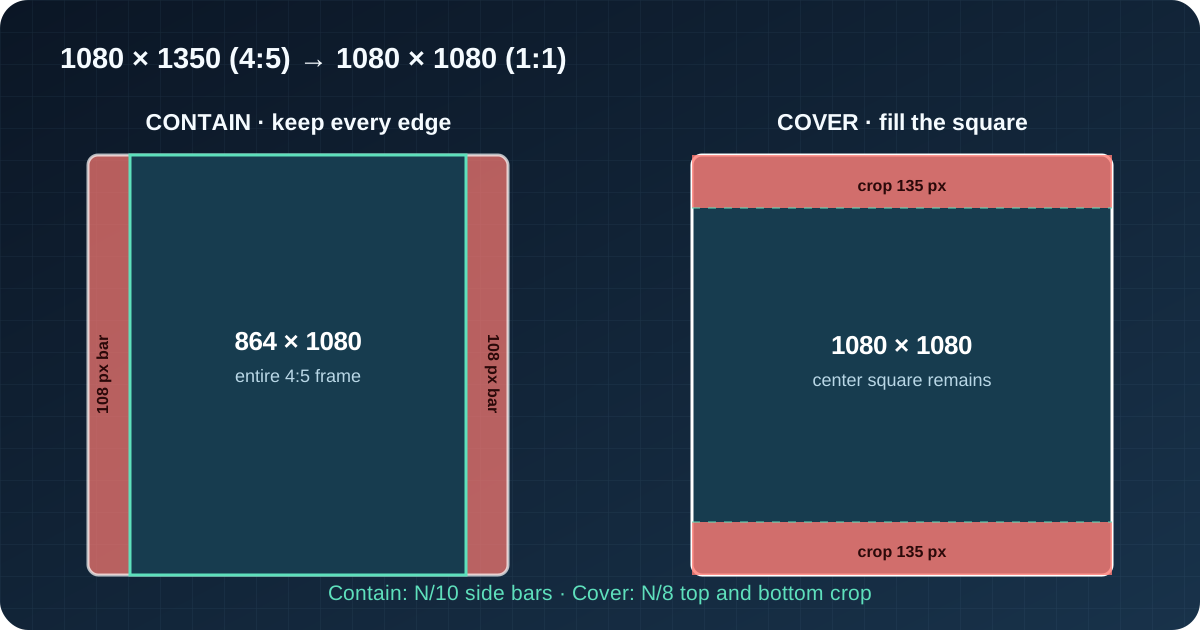
One square slot, two honest outcomes
Let the square side be N. A 4:5 creative scaled to fit completely uses the square height, so its displayed width is 4N ÷ 5. The unused width is N ÷ 5 in total, or N ÷ 10 on each side.
A 4:5 creative scaled to cover the square uses the square width. Its displayed height is 5N ÷ 4. The excess height is N ÷ 4 in total, or N ÷ 8 at both the top and bottom.
1080 × 1350 → 1080 × 1080 square
contain: 1080/1350 = 0.8; display = 864 × 1080; bars = (1080 − 864)/2 = 108 px per side
cover: width scale = 1; crop = (1350 − 1080)/2 = 135 px top and bottom
Contain fills 80% of the square width. Cover retains 80% of the source height. Those percentages match, but the pixel coordinates do not.
The same ledger at Meta's 1440 × 1800 minimum
Meta's current minimum-image table lists 1440 × 1800 for a 4:5 Facebook Feed image. In a 1440 × 1440 square, contain scales the creative to 1152 × 1440 and leaves 144-pixel side bars. Cover retains a 1440 × 1440 center square and removes 180 pixels from both the top and bottom.
| 4:5 source | Square slot | Contain result | Cover result |
|---|---|---|---|
| 1080 × 1350 | 1080 × 1080 | 864 × 1080 + 108 px/side | crop 135 px top + bottom |
| 1440 × 1800 | 1440 × 1440 | 1152 × 1440 + 144 px/side | crop 180 px top + bottom |
| 720 × 900 | 720 × 720 | 576 × 720 + 72 px/side | crop 90 px top + bottom |
| N × 1.25N | N × N | 0.8N × N + 0.1N/side | crop 0.125N top + bottom |
Why “10% safe margin” is not one universal instruction
In contain mode, each side bar is 10% of the square slot width. In cover mode, each cropped strip is 10% of the 4:5 source height, but 12.5% of the square side. Saying only “keep a 10% margin” hides the coordinate system and the direction of loss.
The 4:5-to-square ratio mismatch is also separate from interface safe zones. A fit rule changes which image pixels reach the slot. Buttons, captions and profile controls may then cover some of the pixels that remain. Calculate the ratio conversion first; check placement overlays second.
Use a 4:5 master without guessing the fallback
- 1Choose the placement
Facebook Feed, Reels, Stories, Marketplace and right-column placements do not share one preferred ratio.
- 2Choose contain or cover
If every edge must remain, plan for bars. If the square must be full-bleed, approve the top-and-bottom crop.
- 3Protect the center square
For a 1080 × 1350 master, keep irreplaceable content inside the center 1080 × 1080 when a square cover version may be used.
- 4Preview the actual placement
Meta can generate crops and other adaptations. Check the generated version before publishing instead of treating this model as a promise of live behavior.
If both presentations matter, export a deliberate 4:5 version and a deliberate 1:1 version. A single file can preserve the entire frame or fill both shapes, but it cannot do both without adding background or changing the composition.
Facebook aspect-ratio calculation questions
What aspect ratio should I use for Facebook Feed?
Meta's current guidance supports 1:1 and 4:5 for Facebook Feed images and videos and recommends 4:5 for single-image Feed ads. Use the placement preview because one asset can be adapted for other surfaces.
What happens to 1080 × 1350 in a square?
Contain produces 864 × 1080 with 108-pixel bars on each side. Cover produces a 1080 × 1080 center crop that removes 135 pixels from the top and 135 from the bottom.
Does Facebook always crop 4:5 to square on desktop?
No universal behavior is asserted here. Meta's placement table says desktop Facebook Feed video displays at 1:1 and may show side black bars; this page calculates explicit contain and cover models so the alternatives are measurable.
Is the crop margin the same as a Facebook safe zone?
No. The calculated margin comes from fitting one aspect ratio into another. A safe zone accounts for interface overlays after the image has been fitted.
Calculation scope and sources
This guide uses centered, square-pixel contain and cover models. It does not claim every Facebook surface uses either model in every device or mode. For a general missing-side calculation, use the image aspect ratio calculator; for exact 4:5-to-1:1 arithmetic, use the formulas and named coordinate systems above.
Placement claims were checked against Meta's aspect-ratio best practices, minimum image requirements, and supported-placement ratios. Every conversion in this page was recalculated from 4:5 and 1:1.