Aspect Ratio Calculator for Images
Enter an image's pixel width and height to simplify its ratio, then choose a new width to get the matching height. A 4032 × 3024 image simplifies to 4:3; resized to 1600 px wide, it becomes 1600 × 1200 px.
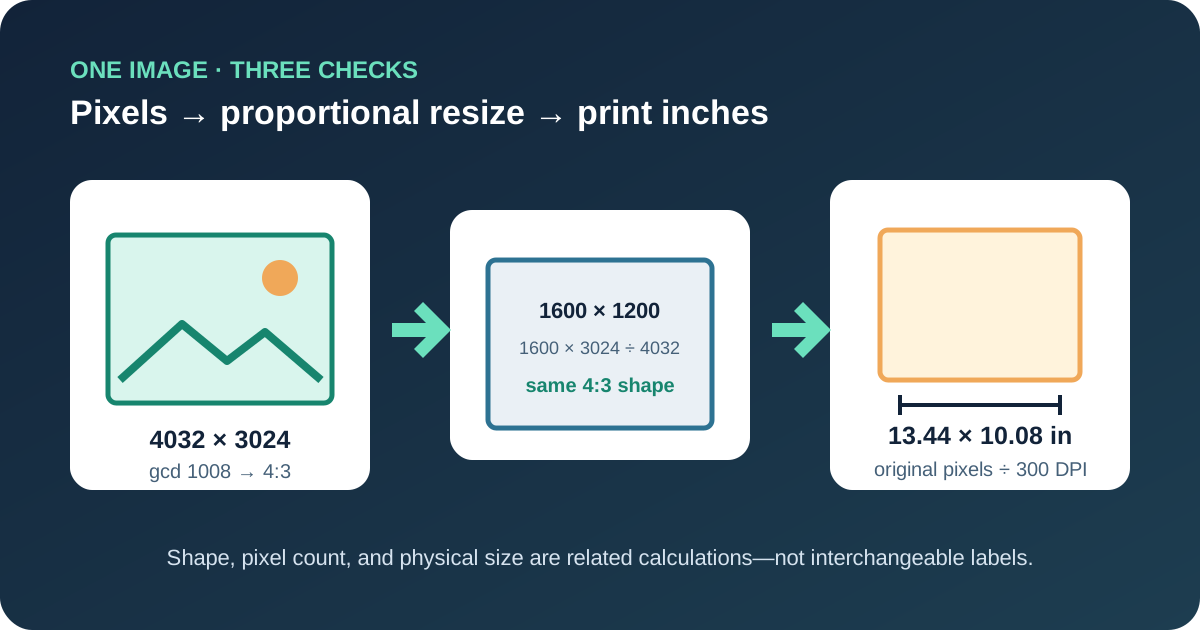
Turn image pixels into a simplified ratio
For an image W pixels wide and H pixels high, find gcd(W, H), the greatest common divisor. Divide both dimensions by that number. With 4032 × 3024, gcd(4032, 3024) = 1008. The reduced terms are 4032 ÷ 1008 = 4 and 3024 ÷ 1008 = 3, so the exact image ratio is 4:3.
Pixel-to-ratio check
4032 ÷ 1008 = 4
3024 ÷ 1008 = 3
4032:3024 = 4:3
Decimal shape = 4032 ÷ 3024 = 1.333333…
The colon ratio describes shape, not file size, compression, or image quality. Two files can both be 4:3 while having very different pixel counts. A 400 × 300 preview and a 4032 × 3024 photo share the same proportion because both pairs reduce to 4:3.
Resize an image without changing its shape
To resize from original dimensions W₁ × H₁ to a target width W₂, calculate H₂ = W₂ × H₁ ÷ W₁. For the 4032 × 3024 example at a target width of 1600, H₂ = 1600 × 3024 ÷ 4032 = 1200. Exporting 1600 × 1200 preserves the original 4:3 frame without stretching.
If height is the fixed side, reverse the relationship: W₂ = H₂ × W₁ ÷ H₁. For a 6000 × 4000 image with target height 1000, W₂ = 1000 × 6000 ÷ 4000 = 1500. The result is 1500 × 1000, still 3:2.
When the result is fractional, a bitmap needs an integer pixel. Keep the unrounded result first, then choose a rounding rule and verify the final pair. For 16:9 at 1366 px wide, the exact height is 768.375 px; 1366 × 768 is close to 16:9 but not exact because 1366 × 9 = 12,294 while 768 × 16 = 12,288.
Three-step image verification card
- 1Input
Enter original pixel width and height, a target width, and print DPI.
- 2Calculate
Reduce the ratio, solve the matching target height, and divide pixels by DPI.
- 3Result
Cross-check the resize and read the physical print dimensions in inches.
Convert pixels to print size with DPI
Aspect ratio stays the same when an image moves from screen pixels to a physical print. DPI answers a separate question: how many image pixels are assigned to each printed inch. Print width in inches = pixel width ÷ DPI, and print height in inches = pixel height ÷ DPI.
Reproducible print example
A 3600 × 2400 image is 3:2.
At 300 DPI: 3600 ÷ 300 = 12 inches and 2400 ÷ 300 = 8 inches.
At 240 DPI: 3600 ÷ 240 = 15 inches and 2400 ÷ 240 = 10 inches.
Changing the DPI field alone changes the calculated physical size, not the stored pixel dimensions or the image ratio. Resampling is a different operation because it adds or removes pixels. Keep those operations separate: first determine the required shape, then the pixel dimensions, then the print size at the chosen DPI.
Common image ratio presets with verifiable pixels
1080 × 1080. Both sides divide by 1080 to give 1:1.
1080 × 1350. Both sides divide by 270 to give 4:5.
1080 × 1920. Both sides divide by 120 to give 9:16.
1920 × 1080. Both sides divide by 120 to give 16:9.
6000 × 4000. Both sides divide by 2000 to give 3:2.
1500 × 500. Both sides divide by 500 to give 3:1.
These are arithmetic examples of reusable canvas shapes, not platform requirements. Before exporting for a service, printer, or document, use that destination's current specification and then apply the same ratio and resize formulas.
Image calculation reference
| Question | Input | Formula | Result |
|---|---|---|---|
| What is the ratio? | 4032 × 3024 | Divide by gcd 1008 | 4:3 |
| What height keeps the ratio? | 4032 × 3024, W = 1600 | 1600 × 3024 ÷ 4032 | 1200 px |
| What width keeps the ratio? | 6000 × 4000, H = 1000 | 1000 × 6000 ÷ 4000 | 1500 px |
| How large is the print? | 3600 × 2400 at 300 DPI | Pixels ÷ 300 | 12 × 8 in |
For a proportional resize, cross-multiply the original and target pairs: W₁ × H₂ must equal H₁ × W₂ before rounding. For 4032 × 3024 and 1600 × 1200, both products equal 4,838,400, confirming the same ratio.
Image aspect ratio questions
How do I calculate the aspect ratio of an image?
Divide both whole-number pixel dimensions by their greatest common divisor. For 4032 × 3024, divide both by 1008 to get 4:3.
How do I resize an image without stretching it?
For a target width, multiply that width by the original height and divide by the original width. Keep the calculated height with the target width.
Does DPI change image aspect ratio?
No. DPI converts pixel dimensions to physical inches. Using the same DPI on both axes preserves the aspect ratio.
Why can a calculated image height contain a fraction?
The exact proportional result may fall between whole pixels. Choose a rounding rule for export, then verify the final integer dimensions because rounding introduces a small ratio difference.