Aspect Ratio Area Loss Calculator
A centered 4:3 to 16:9 crop keeps 75% of the source area and discards 25%. On a 4032 × 3024 image, the exact crop is 4032 × 2268.
- Source ratio
- 4:3
- Target ratio
- 16:9
- Crop size
- 4032 × 2268
- Retained area
- 75%
- Discarded area
- 25%
- Per-side removal
- 378 px top/bottom
One crop, measured three ways
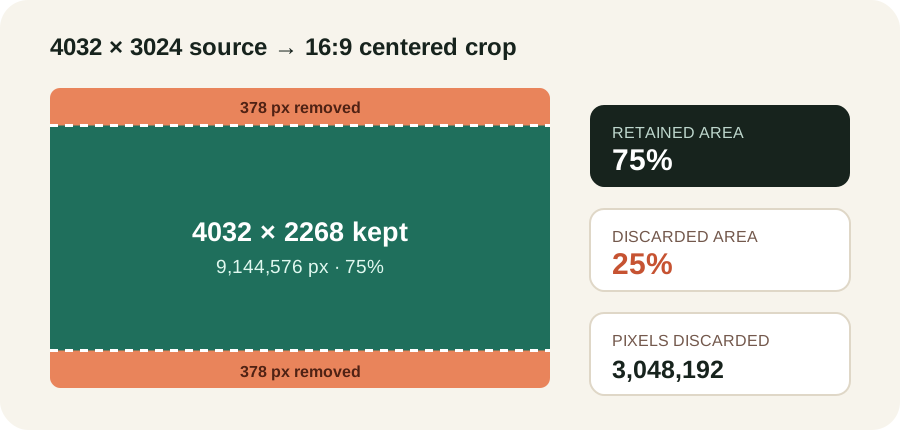
The source contains 12,192,768 pixels. The centered 16:9 window contains 9,144,576 pixels, leaving 3,048,192 pixels outside the crop. The removed bands are 4032 × 378 pixels each, so the top and bottom losses are equal. This geometric ledger makes the percentage auditable instead of treating “some cropping” as a visual guess.
The area-loss formula
Let the source be W × H and the target ratio be A:B. First compare W/H with A/B. If the source is wider, keep the full height and calculate crop width = H × A/B. If the source is taller or narrower, keep the full width and calculate crop height = W × B/A.
retained % = crop width × crop height ÷ (W × H) × 100loss % = 100 − retained %
For 4032 × 3024 to 16:9, the source ratio is 4:3, which is narrower than 16:9. Width stays at 4032 and crop height is 4032 × 9 ÷ 16 = 2268. Retained area is 9,144,576 ÷ 12,192,768 = 0.75, so exactly 25% is discarded.
The ratio-only shortcut is retained fraction = min((A/B)/(W/H), (W/H)/(A/B)). It returns the same 0.75 without knowing pixel dimensions. Pixel dimensions are still required to report the crop rectangle and per-side removal.
Four controlled crop tests
| Source | Target | Exact crop | Retained | Discarded |
|---|---|---|---|---|
| 4000 × 3000 (4:3) | 16:9 | 4000 × 2250 | 75% | 25% |
| 6000 × 4000 (3:2) | 4:5 | 3200 × 4000 | 53.3333% | 46.6667% |
| 3840 × 2160 (16:9) | 1:1 | 2160 × 2160 | 56.25% | 43.75% |
| 1080 × 1920 (9:16) | 4:5 | 1080 × 1350 | 70.3125% | 29.6875% |
The first and third tests use the same two ratio shapes in opposite directions. Their losses differ: 4:3 to 16:9 discards 25%, while 16:9 to 1:1 discards 43.75%. Area loss depends on the quotient between source and target ratios, not on the target label alone.
The 3:2 to 4:5 test removes 2,800 of 6,000 width pixels, split into 1,400-pixel side bands. Although 46.6667% of the width is removed, the same percentage of area is lost because the full height is retained. The portrait test instead removes 570 of 1,920 height pixels, split into 285-pixel top and bottom bands.
Exact geometry versus integer pixels
A target crop can land between pixel boundaries. For 1080 × 1350 cropped to 9:16, the exact width is 759.375 pixels. Flooring to 759 keeps the crop inside the source but produces a measured ratio of 759:1350, which is 0.04938% narrower than 9:16. Rounding to 759 gives the same result; rounding to 760 would be 0.08230% wider.
This calculator separates the ideal area calculation from the selected integer crop. The percentage is recomputed from the actual integer dimensions when a pixel rounding mode is chosen. That prevents an exact-ratio percentage from being attached to a crop rectangle that cannot exist on the pixel grid.
How to use the result
- Check the loss before cropping: the discarded percentage tells you how much of the frame cannot survive a fill crop.
- Inspect the axis: width loss means left and right edges disappear; height loss means top and bottom edges disappear.
- Move the anchor if needed: the percentage stays constant, but an off-center crop can protect a face or subject near one edge.
- Choose contain instead of cover when loss is unacceptable: the whole image remains visible, with padding rather than discarded content.
Area-loss questions
Does a centered crop lose less area than an edge crop?
No. For the same source and target ratios, every full-bleed crop rectangle has the same dimensions and area. Centering changes which pixels are removed, not how many.
Is area loss the same as quality loss?
No. Area loss measures discarded composition. Remaining pixels may still be sharp, and resizing the crop afterward introduces a separate sampling question.
Why does a 4:3 to 16:9 crop lose 25%?
The source must keep its full width and reduce height from three relative units to 2.25. The retained fraction is 2.25 ÷ 3 = 0.75, leaving 0.25 discarded.
What happens when the ratios already match?
The crop equals the source, retained area is 100%, and discarded area is 0%. No edge pixels need to be removed.
Method and sources
The calculator derives a largest centered rectangle at the requested ratio, then divides its area by the source area. It does not infer a safe subject position or claim that every crop is compositionally acceptable.
Evidence checked 2026-11-02: MDN object-fit, MDN aspect-ratio guidance, ImageMagick resize examples, and Apple center-crop documentation. These sources establish cover, contain and centered-crop behavior; all dimensions, comparisons and error calculations on this page were produced for this page.