Projector Screen Dimensions Calculator
For diagonal D and screen ratio A:B, width is D×A÷√(A²+B²) and height is D×B÷√(A²+B²). A 120-inch 16:9 screen is 104.59 by 58.83 inches.
Diagonal-to-screen proof
A projector screen diagonal is the hypotenuse of a rectangle whose legs follow the selected ratio. For a 16:9 screen, the normalized diagonal is √(16²+9²)=√337. Multiplying the 120-inch diagonal by 16/√337 gives 104.59 inches of width; multiplying it by 9/√337 gives 58.83 inches of height. Squaring those answers and adding them returns 14,400, whose square root is the original 120-inch diagonal.
W = D × A ÷ √(A²+B²)
H = D × B ÷ √(A²+B²)
Screen area = W × H
Same diagonal, different screen shapes
The diagonal alone does not determine width or height. This comparison keeps the diagonal at 120 inches and changes only the screen ratio. The 4:3 screen is 96.00 by 72.00 inches and has 6,912 square inches of visible area. The 16:10 screen is 101.76 by 63.60 inches and has 6,471.9 square inches. The wider 16:9 screen reaches 104.59 inches but falls to 58.83 inches high and 6,153.1 square inches.
| Screen ratio | Width | Height | Area | Width vs 16:9 | Height vs 16:9 |
|---|---|---|---|---|---|
| 4:3 | 96.00 in | 72.00 in | 6,912.0 in² | −8.59 in | +13.16 in |
| 16:10 | 101.76 in | 63.60 in | 6,471.9 in² | −2.83 in | +4.76 in |
| 16:9 | 104.59 in | 58.83 in | 6,153.1 in² | baseline | baseline |
This is why two screens sold with the same diagonal can require different wall clearance. Measure the visible image rectangle, not the outer frame, and keep the screen ratio beside the diagonal in any installation note.
Content-fit test: exact black-bar size
The calculator next fits a content rectangle inside the screen without cropping or stretching. If content is wider than the screen, width stays full and content height becomes screen width divided by content ratio. If content is narrower, height stays full and content width becomes screen height multiplied by content ratio. The unused dimension is split equally between opposite sides.
| Content on 120 in 16:9 screen | Image width | Image height | Bars | Each bar | Screen area used |
|---|---|---|---|---|---|
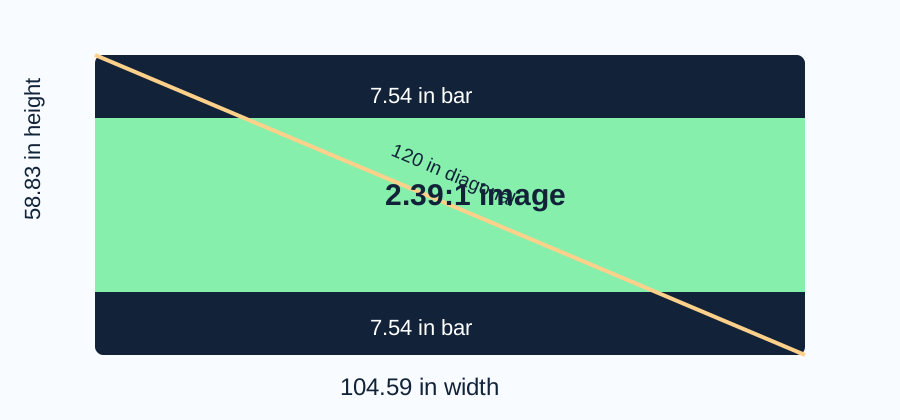
| 2.39:1 | 104.59 in | 43.76 in | top + bottom | 7.54 in | 74.38% |
| 1.85:1 | 104.59 in | 56.53 in | top + bottom | 1.16 in | 96.10% |
| 16:9 | 104.59 in | 58.84 in | none | 0.00 in | 100% |
| 4:3 | 78.44 in | 58.83 in | left + right | 13.07 in | 75.00% |
The 2.39:1 test uses the full 104.59-inch width, so its height is 104.59÷2.39=43.76 inches. The screen is 58.83 inches high, leaving 15.07 inches unused, or 7.54 inches per horizontal bar. The 4:3 test uses the full height; 58.83×4÷3=78.44 inches, leaving 26.14 inches, or 13.07 inches per side.
What screen geometry does not tell you
These results describe the visible rectangle and the fit of one content ratio. They do not calculate throw distance. Throw distance depends on the projector and lens, and manufacturer tables can provide wide and telephoto ranges for a specific model. Screen dimensions should be calculated first, then the resulting image width can be used with that model's documented throw data.
Do not add a bezel, masking frame, stand, or case to the diagonal formula. Those are product dimensions, not image dimensions. Also do not force 2.39:1 content to 16:9 just to remove bars; that changes geometry unless the projector is using a defined crop or anamorphic workflow. A native or fit mode preserves the content shape and makes the unused screen area visible.
Rounding too early produces another avoidable error. Keep the square root and division at full precision, then round the final display values. For the 120-inch example, using 104.6 and 58.8 in the verification gives a reconstructed diagonal slightly different from 120 because both legs were already rounded.
Technical references checked on 2026-11-06
Current manufacturer documentation was checked for the distinction between screen diagonal, image width, image height, projector-specific throw distance, and aspect modes. Ricoh publishes model tables with diagonal, width, height, and wide/tele distance. Panasonic documents separate formulas for screen size and lens position. Epson notes that black bands or cropping can appear when input and selected aspect modes differ. The formulas, four-ratio comparison, content-fit audit, error analysis, calculator, and SVG on this page were created for this page.
Projector screen dimension questions
How wide is a 120-inch 16:9 projector screen?
The visible image is 104.59 inches wide and 58.83 inches high. An outer frame can make the product larger.
How large are the bars for a 2.39:1 movie?
On that 120-inch 16:9 screen, the fitted movie is 104.59 by 43.76 inches, leaving 7.54 inches above and below.
Can diagonal determine projector placement?
No. Placement also needs the exact projector and lens throw data. This calculator supplies the image width and height used by that next check.
Why does a 4:3 screen have more area at the same diagonal?
A less elongated rectangle encloses more area for the same diagonal. At 120 inches, 4:3 gives 6,912 square inches versus 6,153.1 for 16:9.