Print Crop Aspect Ratio Calculator
A 6000 × 4000 photo cropped to a 10 × 8 print keeps 5000 × 4000 pixels. A centered crop removes 500 pixels from each side, discards 16.67% of the image area, and still supplies 500 PPI—more than the 3000 × 2400 pixels needed at 300 PPI.
Direct answer: crop 1000 px total, keep 83.33%5000 × 4000 px crop
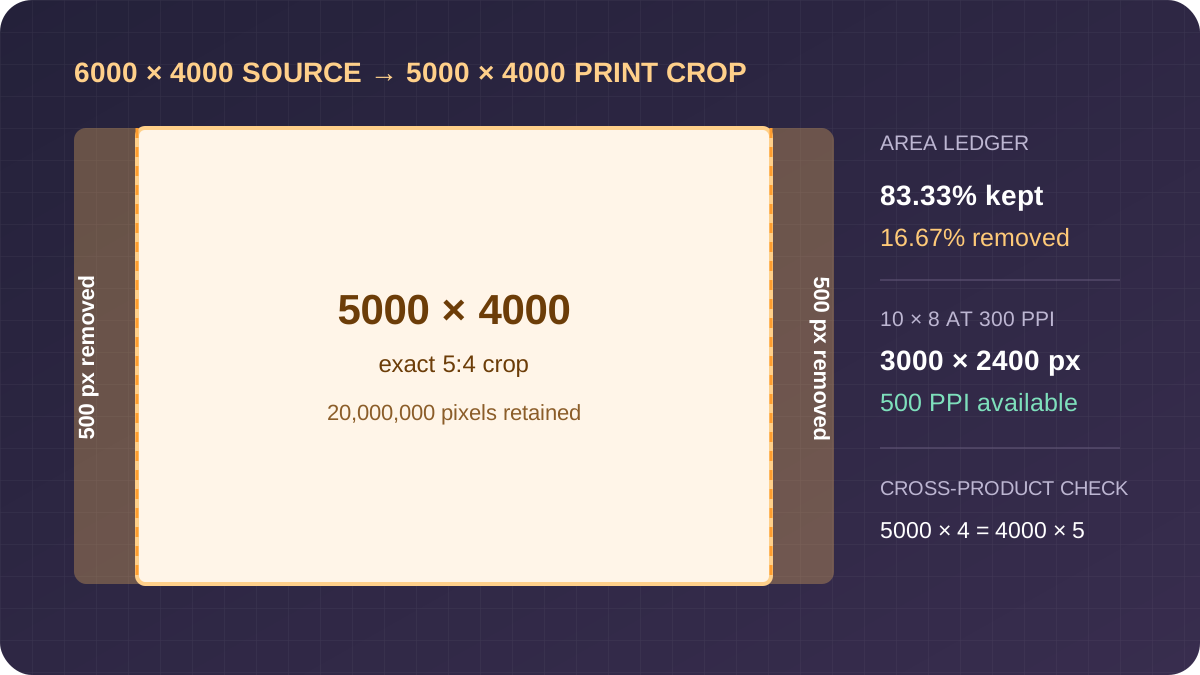
Audit the 6000 × 4000 to 10 × 8 calculation
The source ratio is 6000/4000 = 1.5, or 3:2. The paper ratio is 10/8 = 1.25, or 5:4. Because the photo is wider than the paper, keep the full 4000-pixel height and calculate the matching width: 4000 × 5/4 = 5000 pixels.
The retained-area fraction is 20,000,000 / 24,000,000 = 0.833333, so 83.33% remains and 16.67% is discarded. Cross multiplication checks the crop ratio: 5000 × 4 = 20,000 and 4000 × 5 = 20,000. This is a pixel-exact 5:4 crop, not a stretched resize.
At 300 PPI, a 10 × 8 print asks for 10 × 300 = 3000 pixels by 8 × 300 = 2400 pixels. The crop contains more pixels on both axes. Without resampling, its limiting density is min(5000/10, 4000/8) = 500 PPI.
Crop and print formulas
Let the source be W × H pixels and paper be Pw × Ph inches.
If W/H > Pw/Ph, crop width: Cw=H×Pw/Ph, Ch=H. Otherwise crop height: Cw=W, Ch=W×Ph/Pw.
retained%=Cw×Ch/(W×H)×100; loss%=100-retained%.
At density D, required pixels are Pw×D by Ph×D. Available PPI is min(Cw/Pw, Ch/Ph).
Fractional crop edges require a pixel decision. The calculator rounds the kept edge to the nearest pixel, then reports results from that integer crop. For exact proportions, select source dimensions whose cross products match after rounding or trim one additional pixel manually.
Five reproducible crop tests
| Source | Crop pixels | Area lost | Available PPI | |
|---|---|---|---|---|
| 6000 × 4000 | 10 × 8 | 5000 × 4000 | 16.67% | 500 |
| 6000 × 4000 | 6 × 4 | 6000 × 4000 | 0% | 1000 |
| 4000 × 3000 | 7 × 5 | 4000 × 2857 | 4.77% | 571.4 |
| 4032 × 3024 | 8 × 10 portrait | 2419 × 3024 | 40% | 302.4 |
| 3000 × 3000 | 5 × 7 | 2143 × 3000 | 28.57% | 428.6 |
The portrait test intentionally removes much more area because a landscape 4:3 source and portrait 4:5 paper point in different orientations. Rotating the source first may be correct if the photo itself is sideways; rotating a correctly oriented composition merely to improve the percentage is not.
PPI is not printer DPI
This calculator uses image pixels per inch. Adobe distinguishes image resolution from printer resolution: pixels describe the image data, while printer dots describe the output device. Adobe also documents 300 PPI as a common high-quality target and advises following the printer's own requirement when it differs.
A passing pixel count does not guarantee a good print. Focus, noise, sharpening, viewing distance, paper, printer behavior, borders, bleed, and the lab's trimming tolerance remain separate checks. Confirm whether the stated paper size means the finished sheet, printable area, or bleed size.
Print crop questions
How much of a 3:2 photo is lost on an 8 × 10 print?
For a centered landscape crop, 16.67% of the area is removed. The same percentage applies after rotating both photo and paper to portrait.
Is 300 DPI the same as 300 PPI?
No. This page calculates image pixels per inch. A printer may place multiple ink dots to represent one image pixel.
Does the calculator add pixels?
No. It reports existing cropped pixels and the target pixel requirement. It does not resample or invent detail.
Can I move the crop away from center?
Yes. The total trim stays the same, but an off-center crop assigns more of it to one side.
Sources
References checked on October 30, 2026: Adobe's printed image resolution guide, print dimensions and resolution guide, and crop ratio reference. The formulas, calculator, five tests, error note, comparisons, and SVG are original work for this page.