Crop or Pad Aspect Ratio Calculator
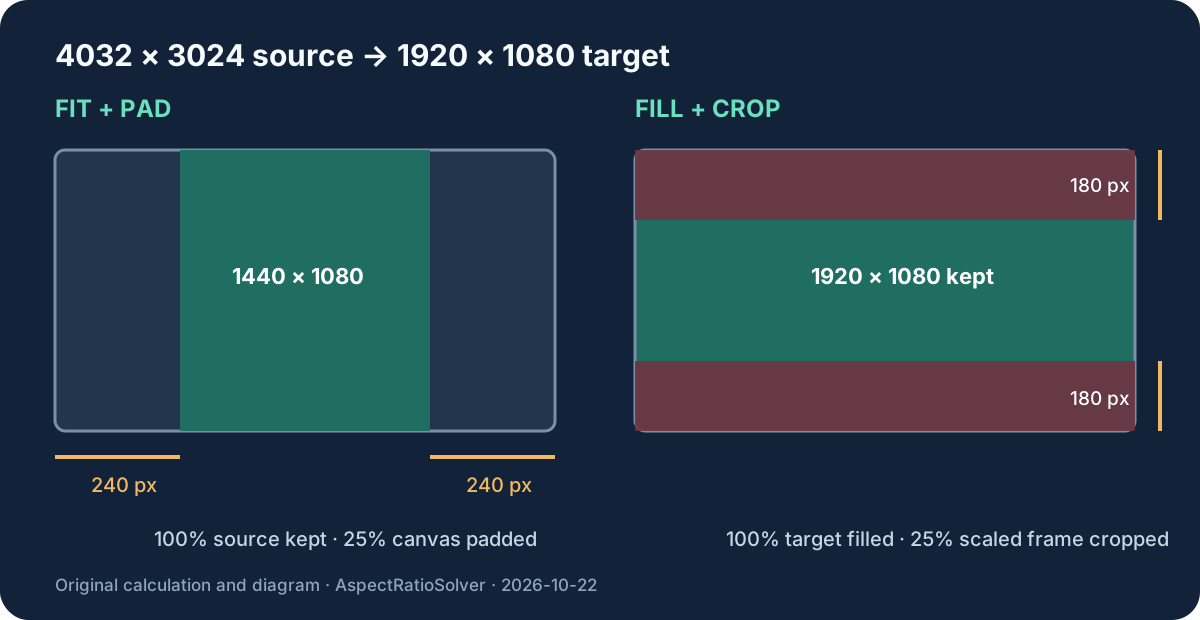
To preserve the whole image, fit it and pad the empty sides. To fill the whole target, scale it to cover and crop the overflow. For 4032 × 3024 into 1920 × 1080, fit makes 1440 × 1080 plus 240 px on the left and right; fill makes 1920 × 1440 and removes 180 px from the top and bottom. Either trade-off affects 25% of the target or scaled frame area.
Keeps 100% of the source. Empty canvas remains.
Fills 100% of the target. Source edges are discarded.
Fit + pad
Left 240 px · right 240 px · top 0 px · bottom 0 px
Padding: 25.00% of the target canvas
Fill + crop
Left 0 px · right 0 px · top 180 px · bottom 180 px
Cropped: 25.00% of the scaled image
The two calculations, audited
Let the source be Ws × Hs and the target be Wt × Ht. For 4032 × 3024 into 1920 × 1080, the width scale is 1920 / 4032 = 0.476190… and the height scale is 1080 / 3024 = 0.357142….
Fit scale = min(Wt / Ws, Ht / Hs). Fill scale = max(Wt / Ws, Ht / Hs).
fit = floor(source × fit scale)fill = ceil(source × fill scale)
The smaller scale fits every source pixel inside the target. Here it produces 1440 × 1080. The unused width is 1920 - 1440 = 480 px, split into 240 px on each side. Padding area is 480 × 1080 = 518,400 pixels. The target contains 1920 × 1080 = 2,073,600 pixels, so 518,400 / 2,073,600 × 100 = 25.00%.
The larger scale covers the target. Here it produces 1920 × 1440. The overflow height is 1440 - 1080 = 360 px, split into 180 px at the top and bottom. Cropped area is 1920 × 360 = 691,200 pixels. The scaled image contains 1920 × 1440 = 2,764,800 pixels, so 691,200 / 2,764,800 × 100 = 25.00%.
Why crop and padding can show the same percentage
A 4:3 frame is 75% as wide as a 16:9 frame when their heights match: (4 / 3) / (16 / 9) = 0.75. That leaves 25% of a 16:9 canvas for padding. When their widths match, the 4:3 source is 1.3333 times as tall as the 16:9 target; retaining 1080 of 1440 rows also keeps 75% and crops 25%.
The matching percentages do not mean the operations are interchangeable. Fit retains every source pixel but adds canvas. Fill uses every target pixel but discards source content. Choose based on whether edge content or a completely filled frame matters more.
Odd pixels and safe rounding
Real dimensions do not always divide cleanly. This calculator floors the fitted width and height so fit never exceeds the target, and ceils the filled width and height so fill never leaves a gap. If the remaining pad or crop is odd, the first side gets floor(total / 2) and the opposite side gets the extra pixel. That deterministic split makes the four sides add back to the exact target difference.
| Case | First side | Opposite side | Total |
|---|---|---|---|
| 480 px pad | 240 px | 240 px | 480 px |
| 361 px crop | 180 px | 181 px | 361 px |
This is an integer-pixel delivery rule, not a claim that rounding preserves the mathematical ratio perfectly. For precision work, keep the unrounded scale during processing and verify the final exported dimensions afterward.
Fit, fill, stretch, or trim?
Fit corresponds to containing the whole source inside the target. Fill corresponds to covering the target. Both preserve the source proportions. Stretching width and height independently does not preserve them. Trimming without scaling is a different operation and only works when the source is already large enough in both dimensions.
The CSS Images specification defines contain and cover sizing behavior, while CSS object-fit exposes those choices for replaced elements. FFmpeg provides separate crop and pad filters for media pipelines. The arithmetic on this page is calculated independently from the entered dimensions.
Crop or pad questions
Should I crop or add black bars?
Add bars when every source edge must remain visible. Crop when the output must be completely filled and losing edge content is acceptable.
How do I calculate pixels cropped from each side?
Scale with the larger target-to-source factor, subtract the target dimension from the scaled dimension, then split that overflow between opposite sides.
How do I calculate letterbox or pillarbox padding?
Scale with the smaller factor, subtract the fitted dimension from the target dimension, then split the unused space between opposite sides.
Does fit or fill change the aspect ratio?
The scale itself does not. Integer rounding can create a tiny final-pixel difference, so verify the exported dimensions if an exact ratio is required.
Sources
References checked on October 22, 2026: W3C CSS Images object sizing, MDN object-fit, and the official FFmpeg crop and pad filter documentation. All examples, side splits, area counts, and comparisons above were calculated for this page.