Camera Sensor to Print Ratio Calculator
Compare the captured pixel ratio with the paper ratio. For a centered fill crop, keep the full shorter-constraining edge, calculate the other edge from the print ratio, and split the removed pixels between opposite sides.
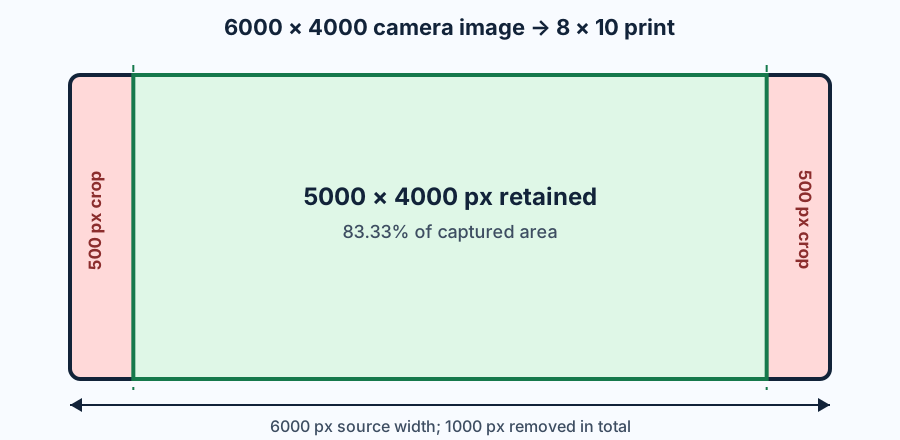
Pixel crop proof for a 3:2 camera frame
A 6000 by 4000 image has a 3:2 ratio, or 1.5. An 8 by 10 print in landscape orientation has a 5:4 ratio, or 1.25. The image is wider than the paper, so height remains 4000 pixels and the printable width becomes 4000×10÷8=5000 pixels. The remaining 1000 pixels are outside the print rectangle. A centered crop removes 500 pixels from the left and 500 from the right.
Crop width = source height × print width ÷ print height
Retained area = crop width × crop height ÷ source width × source height
Crop loss = 1 − retained area
The original contains 24,000,000 pixels and the crop contains 20,000,000. Dividing 20,000,000 by 24,000,000 retains 83.33% of the captured area, so the exact area loss is 16.67%. At 10 by 8 inches, the crop supplies 500 pixels per inch in both directions.
One sensor file across common print shapes
This table holds the source at 6000 by 4000 pixels and changes only the paper shape. The calculations use the full paper size in landscape orientation and a centered fill crop. They do not include printer overscan, bleed, borders, or lab-specific trimming.
| Paper ratio | Crop rectangle | Removed per side | Area retained | Area lost | Available PPI | |
|---|---|---|---|---|---|---|
| 4 × 6 | 3:2 | 6000 × 4000 px | 0 px | 100% | 0% | 1000 |
| 5 × 7 | 7:5 | 5600 × 4000 px | 200 px left/right | 93.33% | 6.67% | 800 |
| 8 × 10 | 5:4 | 5000 × 4000 px | 500 px left/right | 83.33% | 16.67% | 500 |
| 11 × 14 | 14:11 | 5091 × 4000 px | 454.5 px left/right | 84.85% | 15.15% | 363.6 |
| 10 × 10 | 1:1 | 4000 × 4000 px | 1000 px left/right | 66.67% | 33.33% | 400 |
The 4 by 6 print matches the native 3:2 frame and needs no ratio crop. A 5 by 7 print removes 400 pixels total from width, while an 8 by 10 removes 1000. The square print is the most severe test in this set: it discards one third of the image area before any borderless expansion.
Resolution test after the ratio crop
Print resolution must be checked after cropping, not against the uncropped file. At a target of 300 PPI, an 8 by 10 print needs 2400 by 3000 pixels when written portrait-first, or 3000 by 2400 in this landscape calculation. The 5000 by 4000 crop exceeds both requirements and provides 500 PPI.
For a 20 by 16 print using the same 5:4 crop, the pixel rectangle stays 5000 by 4000 but the available density falls to 250 PPI. Nothing about the aspect ratio changed; only the physical print size changed. This separates two questions that are often mixed together: whether the print shape fits the image, and whether the remaining pixels meet a chosen output density.
The calculator reports the limiting density as the smaller of crop width÷print width and crop height÷print height. It also reports the target pixel requirement. If either crop edge is below its target, the shape is still correct but the requested PPI is not met.
Rounding, anchors, and borderless print error
A calculated crop edge can be fractional. A 6000 by 4000 file for 11 by 14 paper gives an ideal width of 5090.909 pixels. A real crop rectangle needs integer coordinates, so 5091 pixels is the closest width. Centering then leaves 909 pixels total, which cannot split into two integer halves; one side receives 454 pixels and the other 455. That one-pixel asymmetry is normal and produces negligible ratio drift.
Centering is only one anchor choice. A portrait near the edge may need the crop shifted left or right while keeping the same 5000 by 4000 size. The calculator quantifies the required rectangle and total removal; the editing decision determines where those removed pixels come from.
Borderless printing can add another crop beyond the ratio conversion. Printer documentation may describe expansion or fit-to-frame behavior that slightly enlarges the image past the paper edge. Treat this calculator as the geometric crop before that device-specific allowance, and use the printer or lab preview for the final trim.
Technical references checked on 2026-11-07
Current manufacturer documentation was checked for the relationship between captured aspect ratio, print shape, and device-side cropping. Canon documentation lists camera aspect-ratio choices and identifies 3:2 as the 35 mm film shape. Nikon support distinguishes 36×24 and 24×16 image areas from a 5:4 crop. Epson documentation states that fit-to-frame and borderless modes can crop or expand a photo. The calculator, pixel ledger, five-print comparison, rounding test, and SVG on this page were created for this page.
Camera sensor and print ratio questions
How much does a 3:2 photo lose when printed at 8 by 10?
A centered fill crop retains 83.33% and removes 16.67% of the image area. A 6000 by 4000 file crops to 5000 by 4000 pixels.
Which common print matches a 3:2 camera image?
A 4 by 6 print is also 3:2, so it needs no ratio crop before printer-specific bleed or borderless expansion.
Should PPI be calculated before or after cropping?
After cropping. Use the pixel dimensions that remain inside the final print rectangle.
Does a centered crop have to remove equal whole pixels?
Not always. If the total removal is odd, one side must lose one more pixel than the other.