Aspect Ratio Tolerance Checker
Pass when the relative ratio error is no greater than your tolerance. The default 1920×1080 measurement is exactly 16:9, so its error is 0%. Change the measured dimensions, target ratio, or allowed percentage to audit a real file or display.
The calculation behind the verdict
The checker treats aspect ratio as width divided by height. For measured dimensions W×H and a target A:B, the measured ratio is W/H and the target ratio is A/B. Their relative error is the absolute value of the measured ratio divided by the target ratio, minus one. Multiplying by 100 expresses the result as a percentage.
Error % = |(W/H) ÷ (A/B) − 1| × 100
Equivalent audit form = |W×B − H×A| ÷ (H×A) × 100
Pass when error % ≤ tolerance %
The second form avoids rounding the two ratios before comparing them. Its numerator is the absolute cross-product gap, |WB−HA|. Its denominator is HA, the target-width cross-product at the measured height. The calculator preserves full browser number precision and rounds only the displayed result.
A tolerance ladder for 16:9 measurements
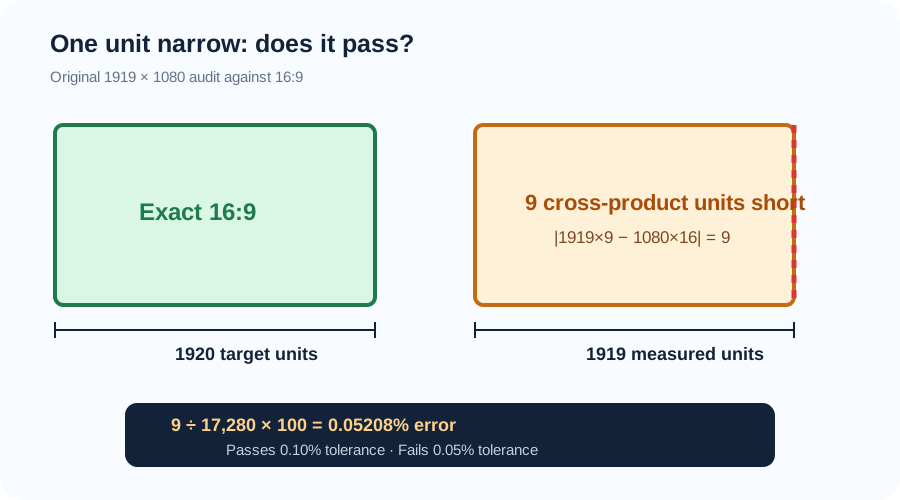
Start with a 1080-unit height. Exact 16:9 width is 1080×16÷9 = 1920. A measured width of 1919 produces a cross-product gap of |1919×9−1080×16| = 9. Dividing 9 by 17,280 gives 0.000520833; after multiplying by 100, the relative ratio error is 0.0520833%.
That one-unit shortage passes a 0.10% limit but fails a 0.05% limit. The boundary is inclusive: an error exactly equal to the chosen tolerance passes. This explicit rule prevents a team from calling the same measurement acceptable in one review and unacceptable in another.
| Measured size | Cross gap | Ratio error | 0.05% limit | 0.10% limit | 0.50% limit |
|---|---|---|---|---|---|
| 1920 × 1080 | 0 | 0.00000% | Pass | Pass | Pass |
| 1919 × 1080 | 9 | 0.05208% | Fail | Pass | Pass |
| 1918 × 1080 | 18 | 0.10417% | Fail | Fail | Pass |
| 1910 × 1080 | 90 | 0.52083% | Fail | Fail | Fail |
The progression is linear at a fixed height: each missing width unit adds nine to the cross-product gap and about 0.05208 percentage points of relative error. At a different height, the percentage for one missing unit changes because the denominator HA changes.
Pixel deviation and ratio error answer different questions
Ratio error is scale-independent. Both 1919×1080 and 3838×2160 have the same measured ratio and therefore the same 0.0520833% error from 16:9. The second file is two pixels short of exact width instead of one, but it is also twice as tall. Relative error correctly reports the same shape deviation.
The width-deviation line answers a production question: at the measured height, how much would width need to change to hit the target exactly? It calculates |W−HA/B|. The height-deviation line performs the reciprocal check, |H−WB/A|. These are diagnostic distances, not a replacement for the percentage tolerance.
Integer pixels can make an exact target impossible at a chosen edge. At height 1000, exact 16:9 width is 1777.777… pixels. Rounding to 1778 creates only 0.0125% ratio error, while rounding to 1777 creates 0.04375%. A tolerance checker tells you whether the chosen integer result is acceptable; it does not pretend the rounded frame is exact.
Three failure modes this check exposes
Rounding the ratio too early. Calling 16:9 simply 1.78 makes 1922.4×1080 appear exact even though its ratio is 0.125% wider than 16:9. Compare cross-products first and round only the presentation.
Using raw pixel difference as a percentage. A ten-pixel width error is not equally important at 320 pixels and 7680 pixels. Normalize by the target cross-product so the verdict measures proportional shape rather than file size.
Applying an undocumented threshold. There is no universal tolerance that fits every delivery, layout, sensor, or measurement process. Enter the acceptance limit supplied by your own specification or workflow. If none exists, the checker can report the deviation, but it cannot invent an authoritative pass limit.
Sources checked on 2026-11-12
Current documentation was checked for the width-first definition of aspect ratio, preferred-ratio behavior in CSS sizing, and the way browser media settings expose width divided by height. The tolerance formula, cross-product audit, test ladder, pixel deviations, calculator logic, comparisons, error analysis, and SVG were independently produced for this page.
Aspect ratio tolerance questions
What does a 1% aspect ratio tolerance mean?
It means the measured width-to-height ratio may differ from the target ratio by at most 1% relative to that target. It does not mean either edge may change by 1% independently.
Should an exact boundary pass?
This checker uses an inclusive rule: error equal to the tolerance passes. If your external specification says otherwise, follow that specification.
Can I use inches, millimeters, or pixels?
Yes. Width and height may use any common unit because the units cancel in W/H. Both measured edges must use the same unit.
Does passing mean no resize or crop is needed?
No. Passing only says the measured shape is within the selected ratio tolerance. Delivery dimensions, resolution, crop, codec, and file-size rules are separate checks.