Aspect Ratio Resize Multiplier Calculator
Use the largest whole multiplier that fits both limits. For a 320×180 source inside 1920×1080, the safe multiplier is 6, producing an exact 1920×1080 output with no fractional source pixels.
The whole-multiplier rule
Let the source be W×H, the containing limit be Mw×Mh, and the scale multiplier be k. A pixel-grid-exact enlargement requires k to be a positive integer. It must satisfy Wk≤Mw and Hk≤Mh. The largest safe value is therefore the floor of the smaller edge allowance.
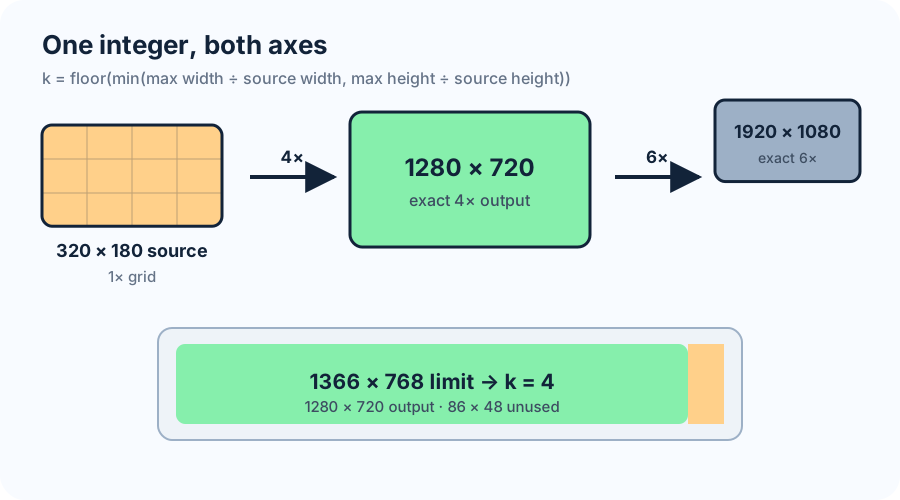
k = floor(min(Mw ÷ W, Mh ÷ H))
Output width = Wk
Output height = Hk
Unused space = (Mw−Wk) by (Mh−Hk)
The same integer multiplies both axes, so the output ratio is Wk/Hk = W/H. Every source pixel covers a k-by-k block in the output. This calculator does not claim that integer scaling is required for ordinary photos; it identifies exact whole-pixel enlargements when that property matters.
Worked test: one source, four limits
For a 320×180 source, a 1920×1080 box permits 1920÷320 = 6 on width and 1080÷180 = 6 on height. The smaller allowance is 6, so the result is exactly 1920×1080. The numerator saved for this run is the selected multiplier 6; its denominator is 1.
A 1366×768 box gives allowances of 4.26875 and 4.26666…. Flooring the smaller value produces k=4, not 4.26666. The exact output is 1280×720, leaving 86 horizontal pixels and 48 vertical pixels unused. A fractional 4.26666× resize could reach 1365.33×768, but it would no longer map each source pixel to an equal whole block.
| Source | Limit | Width allowance | Height allowance | Safe k | Exact output | Unused box |
|---|---|---|---|---|---|---|
| 320 × 180 | 1920 × 1080 | 6.000× | 6.000× | 6× | 1920 × 1080 | 0 × 0 |
| 320 × 180 | 1366 × 768 | 4.26875× | 4.26667× | 4× | 1280 × 720 | 86 × 48 |
| 320 × 180 | 1280 × 800 | 4.000× | 4.44444× | 4× | 1280 × 720 | 0 × 80 |
| 320 × 180 | 1000 × 1000 | 3.125× | 5.55556× | 3× | 960 × 540 | 40 × 460 |
The controlling edge can change with the box. Width controls the 1280×800 and 1000×1000 examples, while height controls 1366×768. Checking only one edge can therefore select a multiplier that overflows the other.
Exact-ratio tests and pixel-grid tests are separate
Multiplying both source dimensions by the same real number preserves the mathematical aspect ratio. A 1.5× resize from 320×180 to 480×270 is still exactly 16:9 because both outputs are integers. However, a single source pixel spans 1.5 output pixels on each axis, so the source grid does not map to equal whole blocks.
Conversely, rounding two independently calculated output edges can alter the ratio. A requested 4.27× enlargement gives 1366.4×768.6 before rounding. Rounding to 1366×769 produces 1.77633 rather than the source ratio 1.77777…. The dimensions are integers, but the ratio and source-grid mapping are no longer exact.
The calculator applies the stricter combined test: one positive integer k, used unchanged on both edges. That guarantees integer dimensions, an unchanged ratio, and uniform k-by-k replication. If the containing box is smaller than the source on either edge, no positive integer enlargement fits; the result reports that condition instead of silently inventing a zero-scale image.
Three mistakes the ledger prevents
Rounding the multiplier upward. In a 1366×768 limit, rounding 4.26666… to 4.27 makes the height exceed 768 before pixel rounding. Flooring the limiting allowance is the safe operation.
Using the generous edge. A 320×180 source appears to fit 5× inside a 1000-pixel-tall box, but that would be 1600 pixels wide. The minimum of the two allowances is mandatory.
Calling every integer output an integer scale. An output such as 1366×768 has whole dimensions, yet neither edge is the same integer multiple of 320×180. Whole output dimensions and whole source-pixel replication are different checks.
Sources checked on 2026-11-13
Current primary documentation was checked for browser pixelated-image behavior and video dimensions that must be divisible by a chosen factor. The multiplier formula, calculator, four-limit test ledger, comparisons, error analysis, and SVG were independently produced for this page.
Resize multiplier questions
What is a safe integer resize multiplier?
It is one positive whole number applied to both source edges without exceeding either output limit. It preserves the ratio and maps every source pixel to an equal whole block.
Why does the calculator use floor instead of round?
Rounding can select a multiplier larger than the limiting edge allows. Flooring guarantees that both calculated output edges remain inside the box.
Can the multiplier be less than 1?
This page checks whole-number enlargement, so the smallest valid multiplier is 1. For reduction, choose explicit output dimensions and test their ratio, divisibility, and resampling requirements separately.
Does an integer multiplier guarantee high image quality?
No. It guarantees geometric and pixel-grid exactness only. Source quality, interpolation, compression, display scaling, and viewing distance remain separate concerns.