Aspect Ratio Crop Anchor Offset Calculator
For a cover crop, keep the requested anchor point in the crop and move the crop window toward it. Example: a 1600 × 1200 source cropped to 1200 × 675 keeps a 1600 × 900 source window that scales to 1200 × 675. A centered crop starts at x=0, y=150; a top anchor starts at y=0.
Calculate the crop rectangle before positioning it
For source dimensions W×H and output dimensions Tw×Th, a cover crop uses scale s=max(Tw/W,Th/H). Its source-space crop window is Cw=Tw/s and Ch=Th/s. The available movement is Δx=W−Cw and Δy=H−Ch.
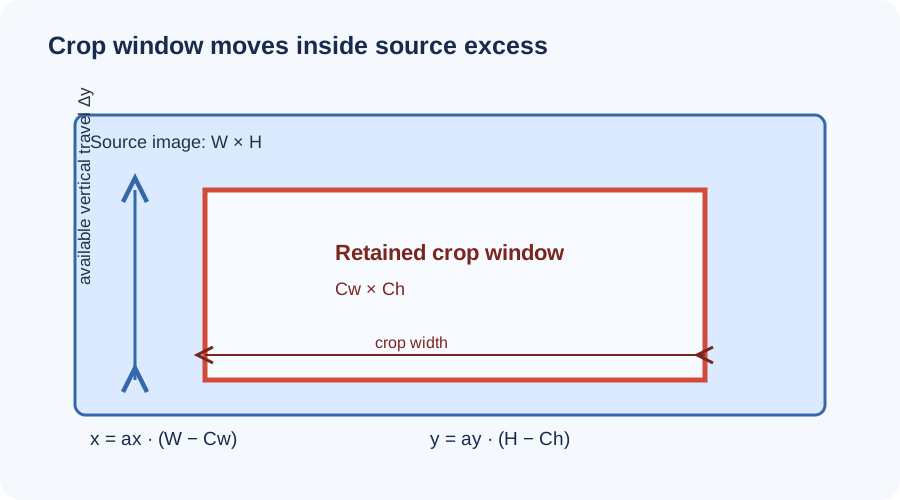
x = ax(W−Cw), y = ay(H−Ch)
Left/top anchor = 0; center = 0.5; right/bottom = 1.
Crop bounds = (x, y, x+Cw, y+Ch).
These are source-pixel coordinates. If the image is resized after cropping, multiply each coordinate and crop dimension by the same scale factor. A fractional result is a geometric boundary; a raster export must apply a stated integer rounding rule.
Five anchor positions, one measured crop
Use a 1600×1200 source and a 1200×675 output. The cover scale is max(1200/1600, 675/1200)=0.75. The crop window is 1600×900, so Δx=0 and Δy=300. The table changes only the vertical anchor; every row preserves all 1600 source pixels horizontally.
| Anchor | ax, ay | Crop origin (x,y) | Kept source rectangle | Discarded top / bottom |
|---|---|---|---|---|
| Top | 0.5, 0 | (0,0) | 1600×900 | 0 / 300 px |
| Center | 0.5, 0.5 | (0,150) | 1600×900 | 150 / 150 px |
| Bottom | 0.5, 1 | (0,300) | 1600×900 | 300 / 0 px |
For a wider target, the horizontal excess becomes active. A 1200×1200 square output has scale 1, crop window 1200×1200, Δx=400, Δy=0. Left, center and right anchors therefore start at x=0, 200 and 400, respectively. The calculator combines both axes, so a top-right choice can keep the upper-right corner while still centering vertically only when the selected vertical anchor is 0.5.
Cross-check the visible focal point
An anchor specifies where the crop window sits in the available movement; it is not an arbitrary promise that every focal point remains visible. If a subject lies at source coordinate (px,py), it remains in the crop only when x≤px≤x+Cw and y≤py≤y+Ch. A subject near the opposite edge can still be cut off by a far-side anchor.
For the 1600×1200 example, a face at (800,120) stays in the top crop [0,900] vertically, but is outside the bottom crop [300,1200]. The center crop [150,1050] also removes it. This concrete check shows why “top” and “center” are not interchangeable settings when the subject is near an edge.
If the output is smaller than the source in both dimensions, cover scaling can make the crop window smaller than the source on both axes only when the ratios require it. If the aspect ratios already match, Δx=Δy=0: changing the anchor cannot move the image or create a crop. Anchors move only along an axis with positive excess.
Common offset errors
Using the output ratio before scaling. Compute s first, then divide both output dimensions by s to get a source-space crop window. Mixing output pixels with source pixels gives offsets in incompatible units.
Reversing the anchor. The formula uses the retained window's starting coordinate: a=0 selects the first edge and a=1 the far edge. A system that instead stores “focal point” coordinates may define its control differently; inspect its convention before translating values.
Clamping a crop window without reporting it. When a user-defined focal point is used, the ideal window may cross the source boundary. Clamp x to [0,Δx] and y to [0,Δy], then report the resulting rectangle. This page's five edge and center anchors already stay within those bounds.
Rounding each side independently. A 1600×1200 crop to 1200×700 yields scale 0.75, Cw=1600 and Ch=933.333…. The centered vertical start is 133.333…. Rounding the top and bottom separately can produce a 1-pixel discrepancy. Keep fractional geometry through calculation, then apply one documented raster rounding rule at export.
Sources checked on 2026-11-14
Current reference documentation was used to verify the distinction between fitting, clipping and positioning image content. The crop-window equations, measurements, anchor comparison and SVG were calculated independently for this page.
Crop anchor questions
What does a crop anchor change?
It changes the crop window's position inside the excess source area. The output size and cover scale stay fixed.
What is the center crop offset?
It is half the excess on each axis: x=(W−Cw)/2 and y=(H−Ch)/2.
Can a left anchor change the vertical crop?
No. A left anchor sets the horizontal position. Choose top, center, or bottom separately for the vertical axis.
Does object-position crop the source file?
CSS object-position controls how replaced content aligns in its box. It changes the visible portion with cover, but does not itself create a new cropped image file.