Anamorphic Desqueeze Aspect Ratio Calculator
Multiply the stored width by the lens squeeze factor. Keep height unchanged. Then divide the expanded width by height to get the display aspect ratio.
What the calculation changes
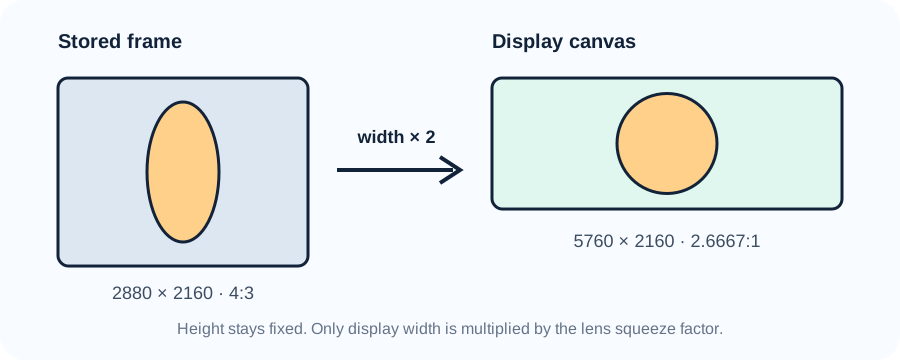
The stored file does not gain recorded detail when it is desqueezed. The calculator uses display-width units so that the geometry is visible without pretending new sensor samples were captured. For a stored frame of 2880 × 2160 and a 2× lens, the display width is 5760 units while height remains 2160. The result is 2.6667:1. If delivery is 2.39:1, a centered crop keeps 5162.4 of those width units and removes 298.8 from each side.
Display width = stored width × squeeze factor
Display aspect ratio = display width ÷ stored height
Centered crop per side = (display width − target width) ÷ 2
Eight-factor test on the same stored frame
This table holds the recorded frame at 2880 × 2160 and changes only the desqueeze factor. That isolates the effect of the lens setting. The last two columns test a centered 2.39:1 finish. A zero crop means the expanded frame is narrower than the target and would need a different fit decision rather than a horizontal crop.
| Factor | Display canvas | Display ratio | Crop each side | Width loss |
|---|
The test exposes a useful boundary: the factor required to reach 2.39:1 from a 4:3 stored frame is 2.39 ÷ (4 ÷ 3) = 1.7925×. A 1.8× setting lands slightly wider at 2.4:1, so only 0.42% of width is removed for an exact 2.39 delivery. A 2× setting lands at 2.6667:1 and removes 10.38%. Those are calculated outcomes, not interchangeable labels.
Error checks before export
First, do not multiply both dimensions. Multiplying width and height by the same number changes resolution but leaves the ratio unchanged, so it cannot undo a horizontal optical squeeze. Second, do not divide the stored width by the squeeze factor. That makes the frame narrower and doubles the distortion direction. Third, keep the unrounded display width for ratio and crop calculations. A fractional factor such as 1.33 can produce a fractional display width; rounding early changes the reported ratio.
For example, 3840 × 2160 at 1.33× gives a display width of 5107.2 and a ratio of 2.3644:1. Replacing 1.33 with the different value 4/3 produces 5120 and 2.3704:1. The 12.8-unit width difference is small but auditable. The calculator therefore uses exactly the factor entered instead of silently treating a decimal label as a fraction.
Metadata and pixels are separate checks. A player or editor may use anamorphic metadata to display the frame correctly without rewriting the stored raster. Exporting to square pixels can create a new raster width, but the arithmetic must still follow the same display-width relationship. Verify the intended factor from the lens or production metadata before committing to a crop.
How anamorphic desqueeze works
An anamorphic lens compresses the scene horizontally when it is recorded. Monitoring or post-production expands that horizontal dimension by the matching factor so circles look circular again. The output shape depends on both the stored frame and the factor: a 2× factor does not guarantee one universal delivery ratio.
Current technical references checked on 2026-11-04 were ARRI's anamorphic desqueeze white paper and CCM-1 quick guide, RED's camera operation documentation, and ARRI's ALEXA LF and SXT technical FAQs. They document horizontal squeeze, monitor desqueeze, common factors, unchanged recorded dimensions, and the need to crop or scale for an intended finish. The formulas, test grid, boundary calculation, crop ledger, and SVG on this page were created specifically for this page.
Anamorphic desqueeze questions
Does a 2× desqueeze double the stored pixel width?
It doubles the horizontal display geometry. The recorded file can remain at its stored dimensions when software interprets metadata; a square-pixel export may be rendered to a wider raster.
Why is a 4:3 frame at 2× equal to 8:3?
Because (4 ÷ 3) × 2 = 8 ÷ 3 = 2.6667. A 2.39:1 finish therefore needs a crop or scale decision.
Is 1.33× exactly the same as 4/3?
No. The decimal 1.33 equals 133/100, while 4/3 repeats indefinitely. Enter the factor specified by the lens or metadata.
Should height ever be multiplied?
Not for the horizontal desqueeze modeled here. Height stays fixed while display width is multiplied by the squeeze factor.