4:5 vs 5:4 Aspect Ratio Checker
Read every ratio as width:height. 4:5 is 0.8:1 and portrait; 5:4 is 1.25:1 and landscape. They become equivalent only after a 90-degree rotation. Enter source pixels to compare the two centered crops.
One pair of numbers, two opposite frames
The order is the entire answer: width comes first and height comes second. A 4:5 frame has four width units for every five height units, so it stands upright. A 5:4 frame has five width units for every four height units, so it lies across the page. Their decimal values, 0.8 and 1.25, multiply to one because the ratios are reciprocals.
4:5 = width ÷ height = 4 ÷ 5 = 0.8
5:4 = width ÷ height = 5 ÷ 4 = 1.25
(4 ÷ 5) × (5 ÷ 4) = 1
Rotation swaps pixel width and height. A precise 1200×1500 4:5 file rotated 90 degrees becomes 1500×1200, which is precise 5:4. Renaming a 1200×1500 file as 5:4 without rotating it is wrong: its measured width-to-height value remains 0.8.
4000×3000 crop ledger
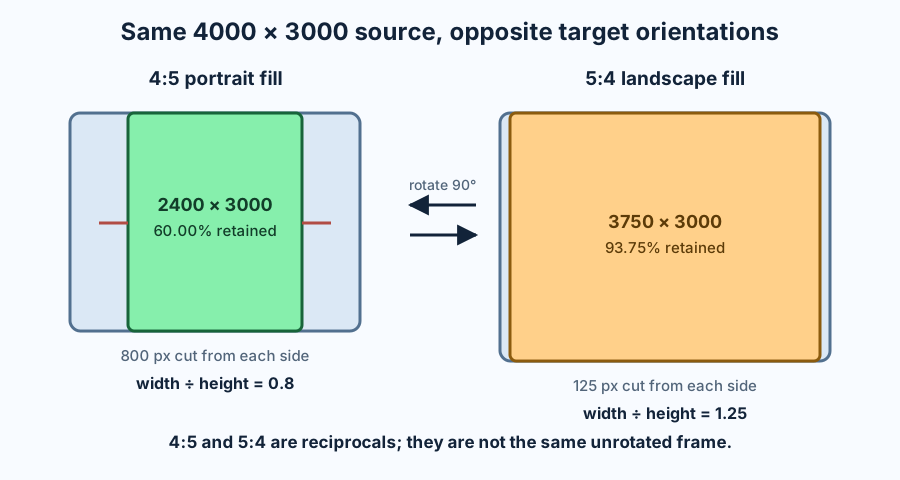
A 4000×3000 source reduces to 4:3. To fill a portrait 4:5 frame while preserving height, the allowed width is 3000×4÷5 = 2400 pixels. The crop removes 1600 pixels in total, or 800 from each side when centered. The kept area is 2400×3000 = 7,200,000 pixels out of 12,000,000, so 60% remains and 40% is discarded.
For a landscape 5:4 frame, preserving the full 4000-pixel width would require 3200 pixels of height, which the source does not have. Preserve height instead: 3000×5÷4 = 3750 pixels wide. The crop removes only 250 pixels in total, or 125 from each side. It keeps 11,250,000 of 12,000,000 pixels, or 93.75%, and discards 6.25%.
| Target | Orientation | Centered crop | Removed left/right | Removed top/bottom | Area retained |
|---|---|---|---|---|---|
| 4:5 | Portrait | 2400 × 3000 | 800 px each | 0 px | 60.00% |
| 5:4 | Landscape | 3750 × 3000 | 125 px each | 0 px | 93.75% |
The two crops do not merely rotate the same source. They ask the unrotated 4:3 source to fill different frames, so their loss differs by 33.75 percentage points. The calculator repeats this ledger for any positive integer dimensions.
Three checks that prevent reversal
First, compare the ratio value with one. Width÷height below one is portrait, above one is landscape, and exactly one is square. This catches the most common label error before any crop is calculated.
Second, use integer cross-products rather than rounded decimals. A measured W×H file is exact 4:5 only when 5W = 4H. It is exact 5:4 only when 4W = 5H. For 1200×1500, both sides of the 4:5 test are 6000, while the 5:4 test produces 4800 and 7500. The result is unambiguous.
Third, reduce the pixels by their greatest common divisor. The GCD of 1200 and 1500 is 300, leaving 4:5. After rotation, 1500×1200 reduces by the same divisor to 5:4. Reduction describes the file that exists; a requested target label does not override it.
Fit, fill, and distortion are different operations
A centered fill crop preserves shape and removes whatever cannot fit. The tool computes the largest target-ratio rectangle inside the source. If the source is wider than the target, it preserves height and cuts width. If the source is narrower, it preserves width and cuts height. Each displayed per-side value assumes a centered crop; an off-center anchor changes the split, not the total removed.
A contain or fit operation preserves the whole source but leaves unused space in the target frame. For 4000×3000 content fitted inside a 3000×3750 4:5 canvas, width is the limiting edge. Scaling by 3000÷4000 gives a 3000×2250 image, leaving 1500 vertical pixels total, or 750 above and below when centered.
Forcing 4000×3000 directly into 3000×3750 without cropping or padding changes horizontal and vertical scale by different amounts. That is distortion, not a ratio conversion. Choose rotate when the composition may turn, crop when the frame must be filled, or fit when every source pixel must remain.
Sources checked on 2026-11-11
Current documentation was checked for the width-first definition of a ratio, responsive media behavior, and a crop tool that exposes 5:4. All reciprocal proofs, cross-products, crop rectangles, retained-area values, calculator logic, comparisons, and the SVG were independently produced for this page.
4:5 and 5:4 questions
Is 4:5 the same as 5:4?
No. 4:5 is portrait and 5:4 is landscape. They match after a 90-degree rotation, not in the same orientation.
What does 4:5 mean in pixels?
Any exact pair is 4k×5k, such as 1080×1350, 1200×1500, or 2400×3000.
What does 5:4 mean in pixels?
Any exact pair is 5k×4k, such as 1250×1000, 1500×1200, or 3750×3000.
Does cropping change orientation?
It can. Cropping a landscape source to a portrait frame removes enough side area to make height greater than width. Rotation is a separate operation.